


At a glance
Expert’s Rating
Pros
- Inoffensive design includes a VESA mount
- Good sharpness and brightness for a budget monitor
- 100Hz refresh rate enhances motion clarity
Cons
- Design is a bit too simple
- Doesn’t ship with a height-adjustable stand
- Modest contrast ratio and color gamut
Our Verdict
Though certainly drab, the MSI Pro MP275Q provides solid image quality for an office productivity monitor, and does it at an appealing price.
Price When Reviewed
This value will show the geolocated pricing text for product undefined
Best Pricing Today
Best Prices Today: MSI PRO MP275Q
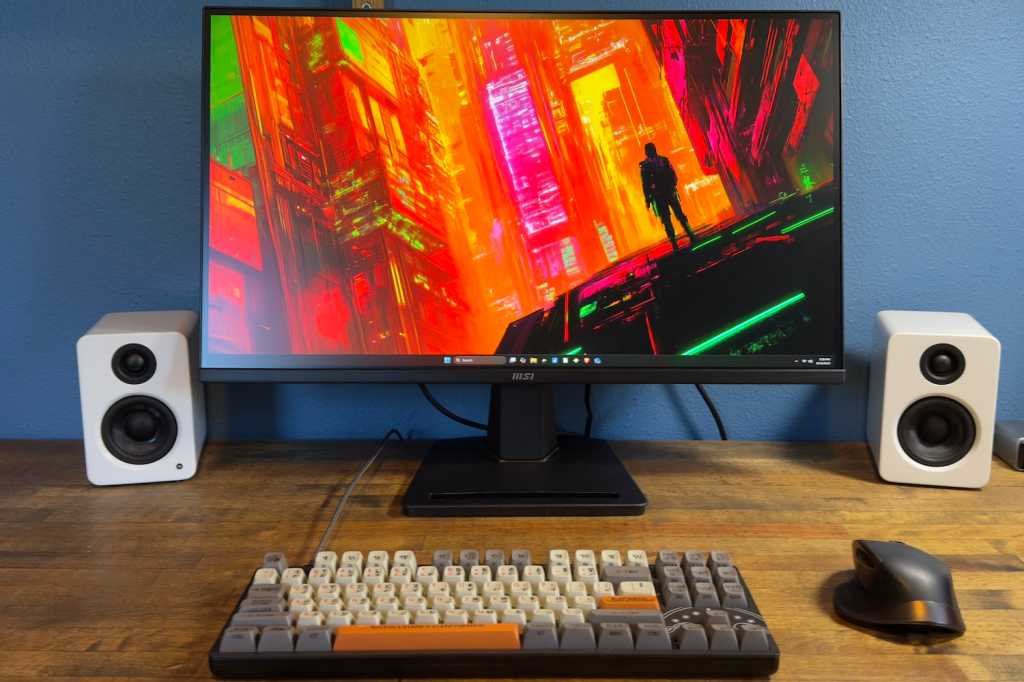
Are you shopping for a basic productivity monitor that won’t disappoint? The MSI Pro MP275Q might be what you need. Though it has a ho-hum design and barebones feature set, it delivers high brightness and sharpness on a budget.
Read on to learn more, then see our roundup of the best home office monitors for comparison.
MSI PRO MP275Q specs and features
The MSI Pro MP275Q’s specifications are firmly targeted at office productivity. It provides a 27-inch panel with 2,560 x 1,440 resolution, which is a nice bump from 1,920 x 1,080. It also has speakers, a VESA mount, and supports both HDR and Adaptive Sync.
- Display size: 27-inch
- Native resolution: 2560×1440
- Panel type: IPS-LED
- Refresh rate: 100Hz
- Adaptive Sync: Yes, Adaptive Sync
- HDR: Yes, “HDR Ready”
- Ports: 2x HDMI 2.0, 1x DisplayPort 1.4, 1x 3.5mm audio-out
- Audio: 2x 2-watt speakers
- VESA Mount: Yes, 100x100mm
- Price: $179.99 MSRP, $139.99 typical retail
Buying the MSI Pro MP275Q will set you back about $180 at MSRP but, like most monitors, it is often on sale and often for less than $150. That’s a decent price for a 27-inch 1440p monitor, but I wouldn’t call it a deal.
MSI PRO MP275Q design
The MSI Pro MP275Q doesn’t make much impression out of the box, and I suspect that’s the point. It’s a “Pro” monitor and, in this case, the professional could be anyone from a work-from-home administrator to a retail clerk ringing up an order. The Pro MP275Q looks fine, and it feels reasonably durable for a budget monitor, but it’s nothing special.
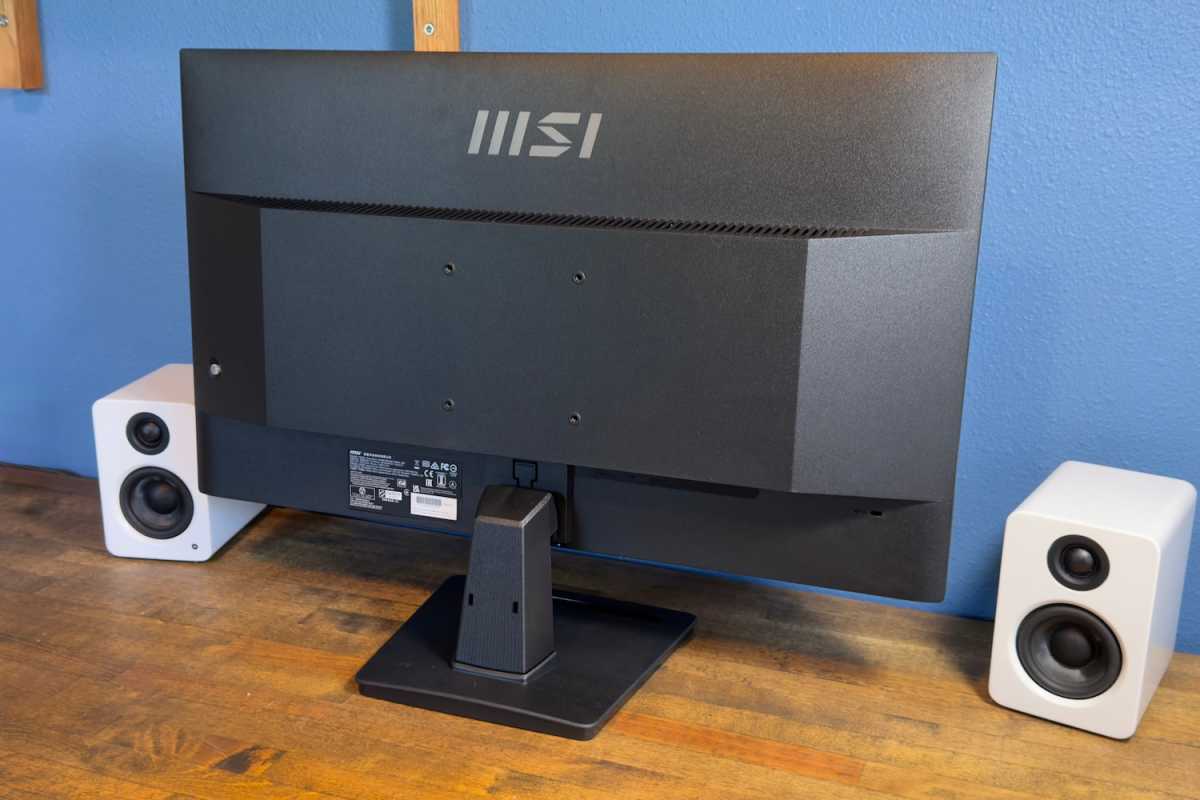
However, the monitor’s function doesn’t live up to its branding. It has a simple stand that only adjusts for tilt. It’s not a tall stand, either, so tall users will find themselves looking down at the screen at an uncomfortable angle.
The monitor does include a 100x100mm VESA mount, at least, so it’s possible to add a third-party stand or monitor arm.
Matthew Smith / Foundry
MSI PRO MP275Q connectivity
MSI keeps it basic with the Pro MP275Q’s connectivity, but it covers the necessities. We’re talking two HDMI 2.0 ports, plus one DisplayPort 1.4, and a 3.5mm audio-out.
This is the expected range of connectivity for a monitor around $150. It’s neither better nor worse than usual. USB-C would be nice, but it’s not common south of $250.
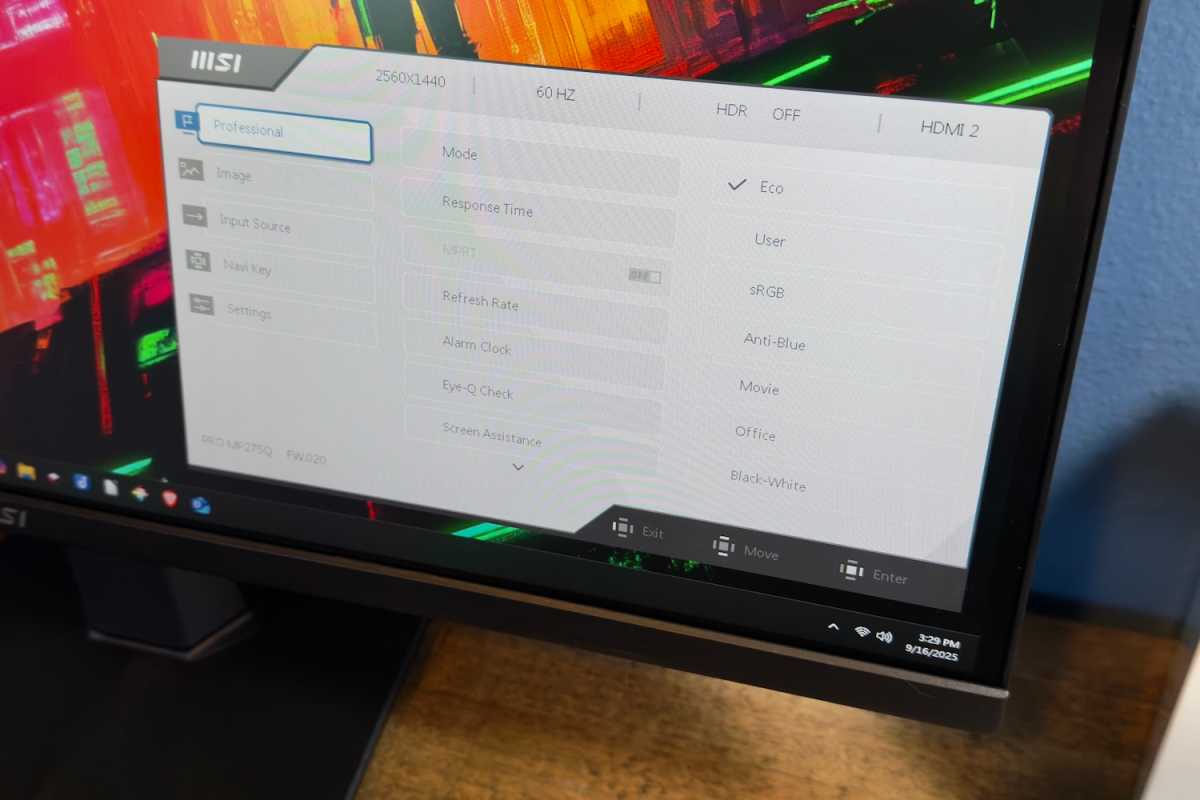
Menu navigation is provided with a joystick tucked around the right flank of the MSI Pro MP275Q. Many monitors offer a joystick (which is often the easiest, most responsive way to navigate a monitor’s menus), so this isn’t unusual.
The monitor’s menu options are easy to navigate, but barebones. There are some image quality presets, a few color temperature options, and an EyeCare mode for reduced eye strain, all of which is normal for a monitor in this price bracket.
You can also adjust monitor features using MSI Display Kit, a desktop software utility. It provides easy access to most monitor options and is often more intuitive to use than the on-screen menu controls. Display Kit is not the most visually appealing example of such a tool—I think those from Asus, BenQ, and Dell look a bit better. Still, it gets the job done.
Matthew Smith / Foundry
The only unusual feature is an “Eye-Q Check” feature, which displays an Amsler Grid that’s supposed to help you determine if you’re experiencing eye strain. Does it work? Probably not. While I was able to find medical studies on using an Amsler Grid to detect problems like macular degeneration, I couldn’t find studies suggesting it’s useful for general eye strain.
A pair of 2-watt speakers are included. They provide modest volume and no hint of bass but, as budget monitor speakers go, they’re not bad. The speakers are fine for listening to podcasts or ambient music at low volumes—which is more than I can say for most budget monitors.
MSI keeps it basic with the Pro MP275Q’s connectivity, but it covers the necessities: two HDMI 2.0 ports, one DisplayPort 1.4, and a 3.5mm audio-out.
MSI PRO MP275Q SDR image quality
The MSI Pro MP275Q is the type of monitor that will frequently be used for spreadsheets, web browsing, PDFs, and other office productivity. These tasks don’t require incredible image quality but benefit from good results in brightness, accuracy, and sharpness. Fortunately, the Pro MP275Q delivers.
Matthew Smith / Foundry
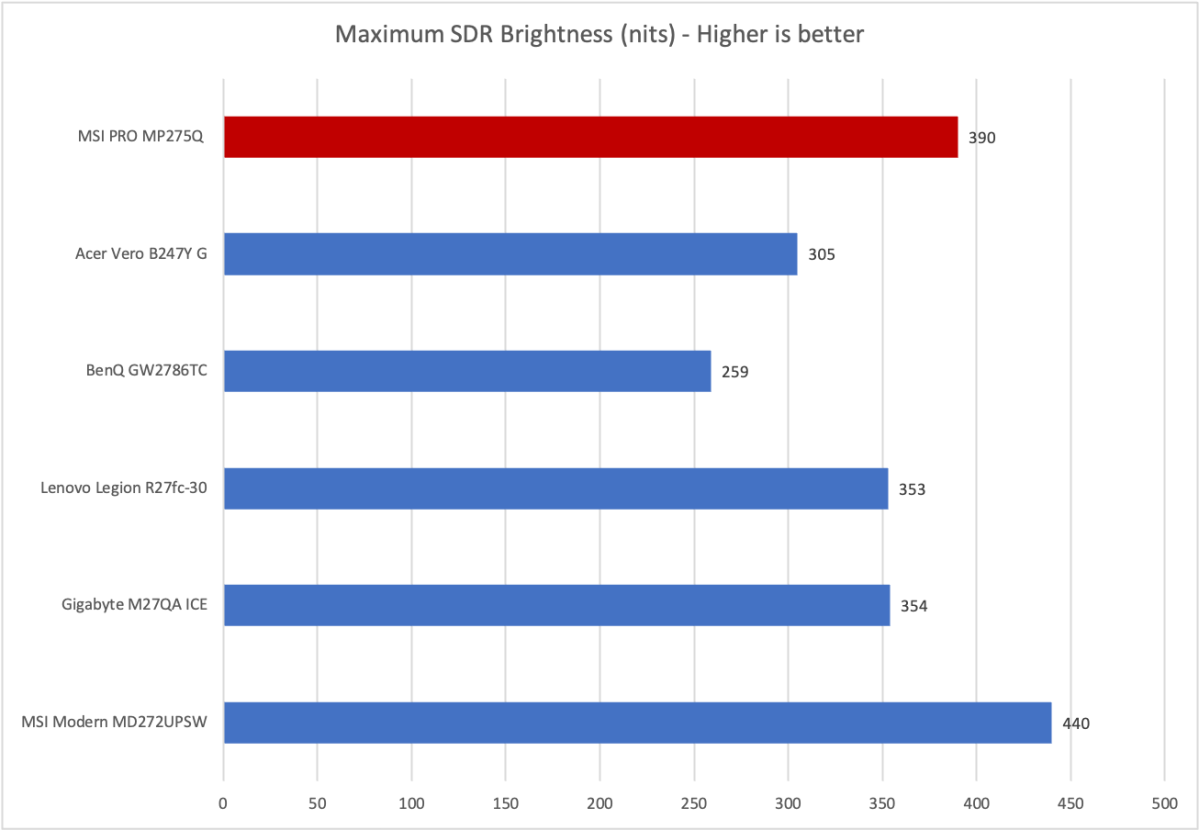
Brightness is definitely a highlight for the MSI Pro MP275Q. A maximum brightness of nearly 400 nits is extremely high for any monitor in the sub-$200 price bracket.
This level of brightness isn’t required in most situations, but it’s helpful if you’re planning to position a monitor near bright windows or in an office environment without light control.
The monitor also has an anti-glare finish to minimize reflections, which further helps with usability in bright rooms. If you want a bright, readable office monitor, the MSI Pro MP275Q is a top choice.
Matthew Smith / Foundry
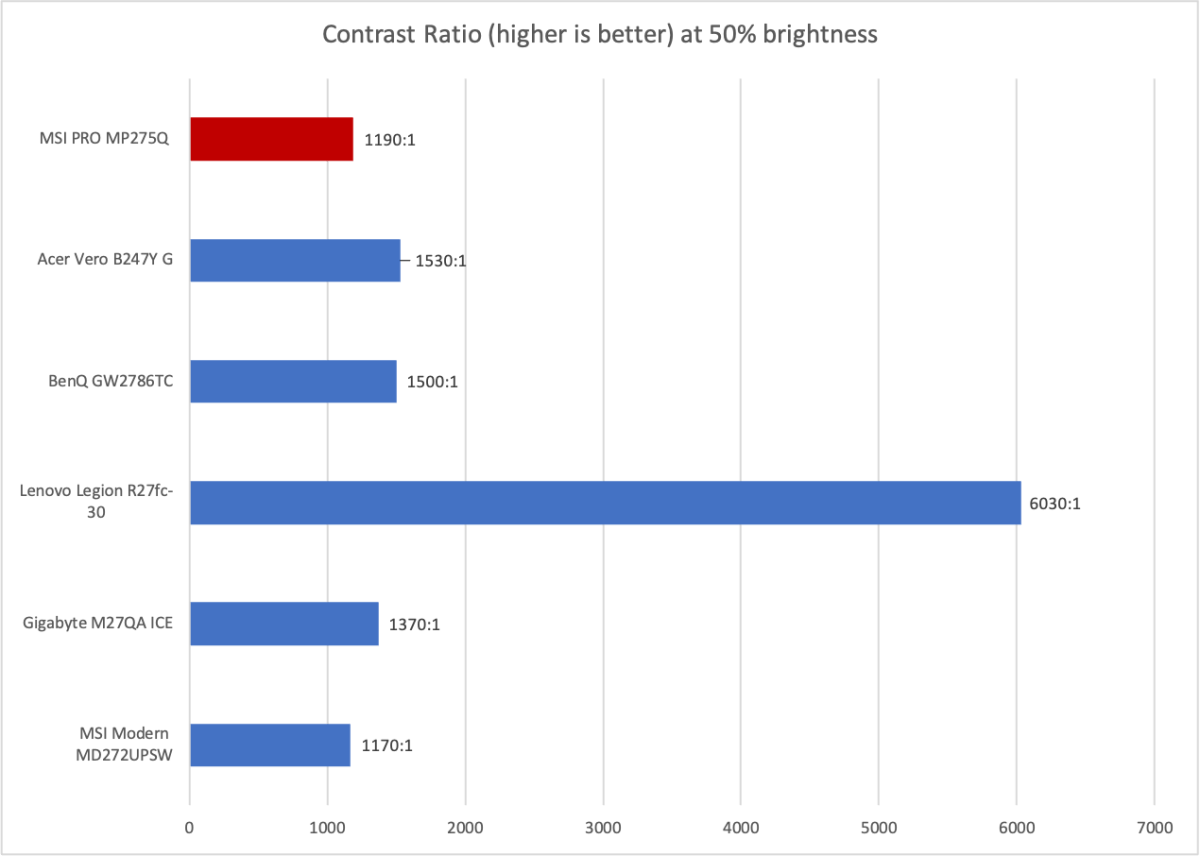
Contrast, on the other hand, is an unsurprising weakness. The MSI Pro MP275Q uses an IPS display panel and doesn’t have a fancy dynamic Mini-LED backlight. Because of that, its contrast ratio is just 1190:1 at 50 percent of maximum brightness.
That’s not a terrible result, and it’s typical of budget IPS monitors. However, technologies like IPS Black and VA panels (like the Lenovo Legion R27fc-30) can achieve a contrast ratio of 3000:1 or better, and OLED’s contrast ratio is effectively infinite. On the other hand, monitors with those technologies are often twice the price.
While the contrast ratio isn’t great, it’s arguably not that important for an office monitor. Text-based workflows rarely benefit much, if at all, from a very high contrast ratio.
Matthew Smith / Foundry
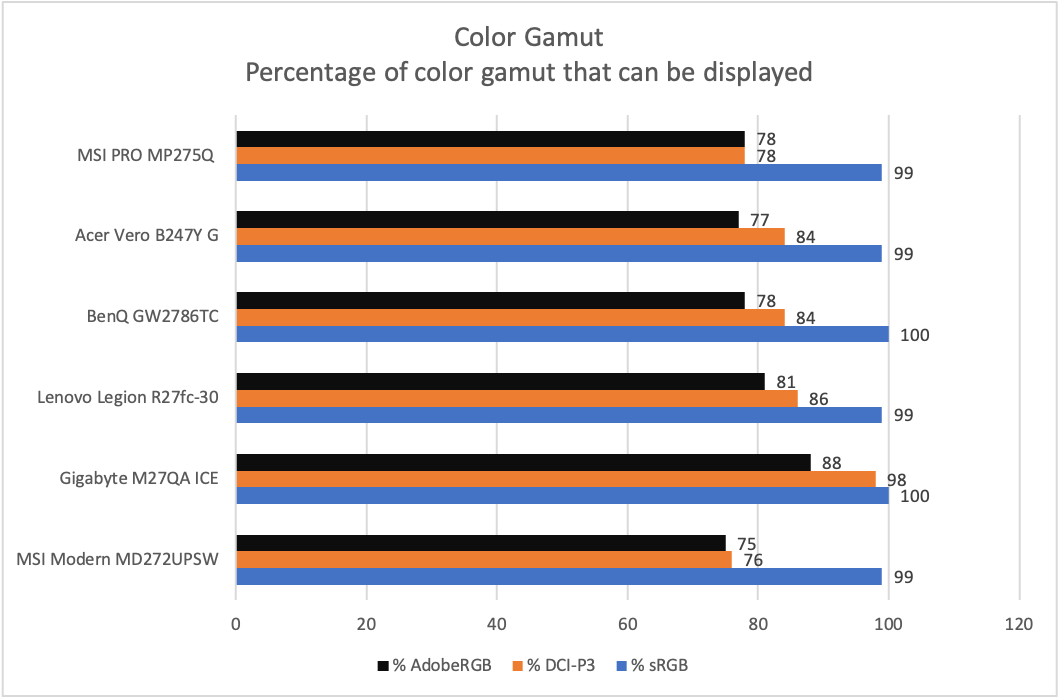
Color gamut isn’t the Pro MP275Q’s strength. It’s okay, with a color gamut that covers 99 percent of sRGB and 78 percent of both DCI-P3 and AdobeRGB. However, these are not impressive figures in 2025, and many alternative monitors do better. The color gamut will be a limitation if you need to do photo or video editing, or digital art, as many colors visible on more capable displays won’t be visible on this monitor.
Matthew Smith / Foundry
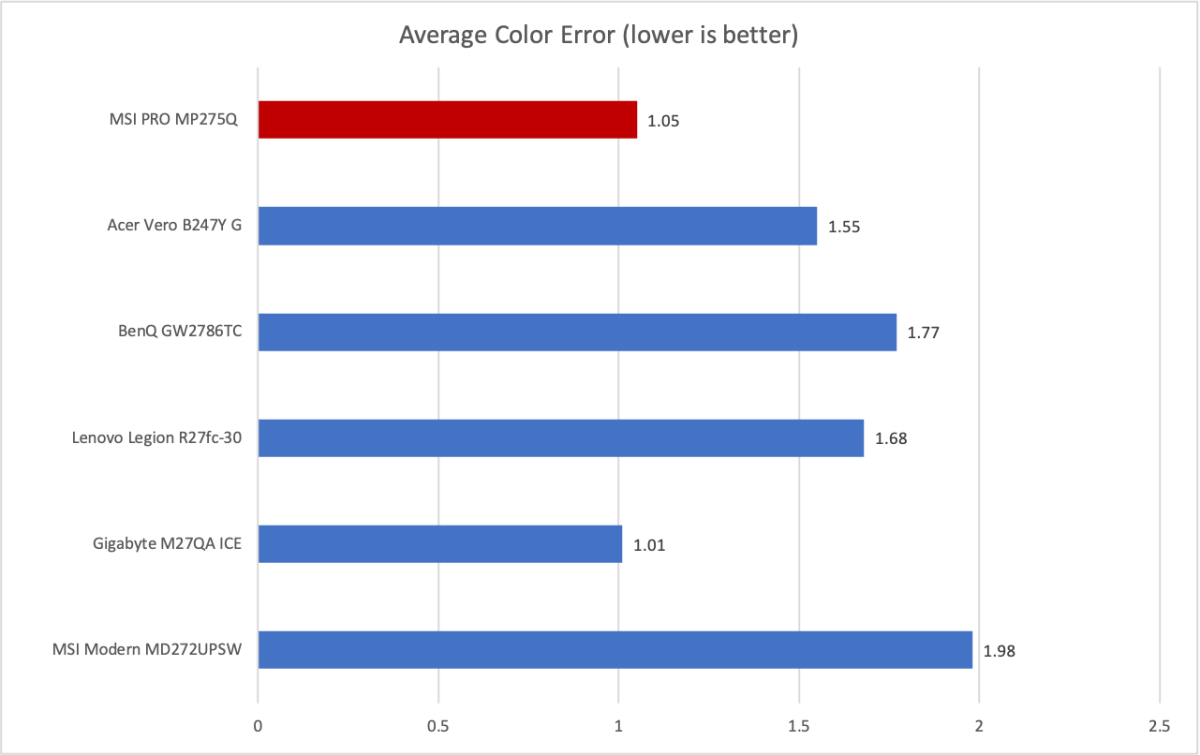
While the Pro MP275Q’s color gamut doesn’t impress, color accuracy is more in its favor. The monitor’s color accuracy is solid, and most people won’t notice any issue. Color inaccuracy is highest in cyan and blue tones—a fairly common result for an IPS-LCD monitor—but even there, it didn’t come across to me in subjective viewing. Again, I wouldn’t recommend using this monitor to edit professional photography for, say, National Geographic. But that’s to be expected at this price point.
The Pro MP275Q’s color temperature and gamma results were fine for a budget display. It displayed a gamma curve of 2.3, off the target of 2.2, which means content looks a tad darker than it should. But this is often hard to notice. The color temperature came in at 6600K, also just a shade off the target of 6500K. I didn’t find that difference noticeable.
Sharpness is a strong point. The Pro MP275Q’s resolution of 2560×1440 works out to about 110 pixels per inch across the 27-inch screen. That’s a respectable pixel density. Speaking personally, I find it sharp enough—and a big upgrade over 1080p. With that said, shoppers should keep in mind that 4K monitors aren’t much more expensive. Even MSI has one priced at $200.
Overall, the MSI Pro MP275Q’s image quality is good for a budget monitor. Its brightness and sharpness make it ideal for its target use case, which is office productivity. The monitor’s color performance and contrast are less impressive, and make it a less appealing choice for entertainment. However, at $150, you’ll be hard pressed to find alternatives that clearly defeat it in SDR image quality.
MSI PRO MP275Q HDR image quality and motion
The MSI Pro MP275Q doesn’t advertise HDR support, but its specifications list it as “HDR Ready.” This is, I think, a fair way to market the monitor. It can technically support an HDR signal, but its image quality is entirely insufficient to do much with HDR. It’s not bright enough, doesn’t have a wide enough color gamut, and doesn’t have enough contrast.
However, this is true of all budget monitors. I actually like that MSI doesn’t advertise this feature. Some budget monitors do, which annoys me, because their claims of HDR support can be misleading. In reality, you’ll need to upgrade to a much more expensive OLED or MiniLED monitor if you want good HDR.
Adaptive Sync is also technically supported, but the Pro MP275Q lacks AMD FreeSync or Nvidia G-Sync certification. My AMD video card did detect it as a variable refresh rate display, however, and I saw smooth motion in games.
The monitor also has a maximum refresh rate of 100Hz. Though that won’t make headlines in 2025, it’s high enough to provide a noticeable improvement in motion clarity. The Pro MP275Q will look a bit less blurry in fast motion than 60Hz competitors. Note, however, that it is fairly subtle—your mileage will vary depending on how sensitive you are to motion clarity improvements.
Gamers should note that budget gaming monitors like the Lenovo Legion R27fc-30 and Pixio PX248 Wave will provide a higher refresh rate of up to 240Hz for less than $200. However, you’ll often have to make a trade-off in either display size or resolution.
Should you buy the MSI PRO MP275Q?
The MSI Pro MP275Q is a workmanlike monitor meant for, well, work. It provides good image quality in SDR with high brightness and sharpness. The monitor’s build quality is simple and notably lacks a height-adjustable stand, which is its only significant flaw. Still, the Pro MP275Q is a good option if you want a 27-inch 1440p monitor for just about any work environment, from a home office to a corporate bullpen.
