
Close Menu
TechUpdateAlert

    Subscribe to Updates

    Get the latest creative news from FooBar about art, design and business.

    What's Hot

    My Health Anxiety Means I Won’t Use Apple’s or Samsung’s Smartwatches. Here’s Why

    December 22, 2025

    You can now buy the OnePlus 15 in the US and score free earbuds if you hurry

    December 22, 2025

    Today’s NYT Connections: Sports Edition Hints, Answers for Dec. 22 #455

    December 22, 2025
    Facebook X (Twitter) Instagram
    Trending
    • My Health Anxiety Means I Won’t Use Apple’s or Samsung’s Smartwatches. Here’s Why
    • You can now buy the OnePlus 15 in the US and score free earbuds if you hurry
    • Today’s NYT Connections: Sports Edition Hints, Answers for Dec. 22 #455
    • Android might finally stop making you tap twice for Wi-Fi
    • Today’s NYT Mini Crossword Answers for Dec. 22
    • Waymo’s robotaxis didn’t know what to do when a city’s traffic lights failed
    • Today’s NYT Wordle Hints, Answer and Help for Dec. 22 #1647
    • You Asked: OLED Sunlight, VHS on 4K TVs, and HDMI Control Issues
    Facebook X (Twitter) Instagram Pinterest Vimeo
    TechUpdateAlertTechUpdateAlert
    • Home
    • Gaming
    • Laptops
    • Mobile
    • Software
    • Reviews
    • AI & Tech
    • Gadgets
    • How-To
    TechUpdateAlert
    Home»Laptops»Windows 11 version 25H2 is out, but when will you get it?
    Laptops

    Windows 11 version 25H2 is out, but when will you get it?

    techupdateadminBy techupdateadminOctober 1, 2025No Comments4 Mins Read
    Share Facebook Twitter Pinterest LinkedIn Tumblr Reddit Telegram Email
    Windows 11 2025 Update download
    Share
    Facebook Twitter LinkedIn Pinterest Email

    Microsoft is officially rolling out the Windows 11 2025 Update (version 25H2) for compatible devices, including Copilot+ PCs.

    Starting September 30, 2025, is the beginning of the gradual rollout as an optional update, and it’ll take some time for the update to reach every device. In addition, since this incremental update shares the same core file system as version 24H2, it’ll install as a cumulative update for devices already running the 2024 Update.

    On the other hand, computers using an older release (such as Windows 11 version 23H2 or another release, including Windows 10) will require a complete reinstallation to upgrade.


    You may like

    Regardless of the version currently installed on your device, you can install the feature update using the “Windows Update” settings, as well as using the “Installation Assistant” or the ISO file.

    This guide outlines the Microsoft servicing approach for upgrading devices to the Windows 11 2025 Update.

    What devices will get the Windows 11 2025 Update first?

    On September 30, 2025, the software giant began the gradual rollout of Windows 11 version 25H2 for devices already running version 24H2 that have the option to turn on the latest update as soon as it becomes available. However, it won’t download automatically. You will have to manually trigger the upgrade process from the “Windows Update” settings page.

    Also, only devices known to be fully compatible will be among the first to receive the update. In the following weeks and months, the company will continue to monitor the rollout, and the enablement package will then expand to additional hardware configurations.

    All the latest news, reviews, and guides for Windows and Xbox diehards.

    Furthermore, since the feature update is based on the same file system as version 24H2, it won’t require reinstallation.

    One thing to note is that several factors can also impact when the new version will be ready for your device. For instance, if the servicing pipeline detects an issue with your hardware configuration or peripherals, incompatible drivers, apps, or security programs, you will be given the option to upgrade once the problem is resolved, but not before. Your geographical location can also determine when the feature update will arrive on your computer.

    If you’re running Windows 11 version 23H2 or Windows 10 version 22H2, you’ll first need to install version 24H2, which requires a complete reinstallation of the operating system. After that, you can install the 25H2 enablement package. However, in the future, the company may offer the option to upgrade directly to version 24H2.

    Can I force the upgrade to the Windows 11 2025 Update?

    Yes, Microsoft offers multiple ways to update your computer to a new version of the operating system.

    If you’re on version 24H2, it’s recommended to use the “Windows Update” settings.

    On the other hand, if you’re still using version 23H2 or Windows 10 22H2, you can also use the “Windows Update” settings. However, since any of these options will perform a reinstallation, you can also use the Installation Assistant or the ISO file.

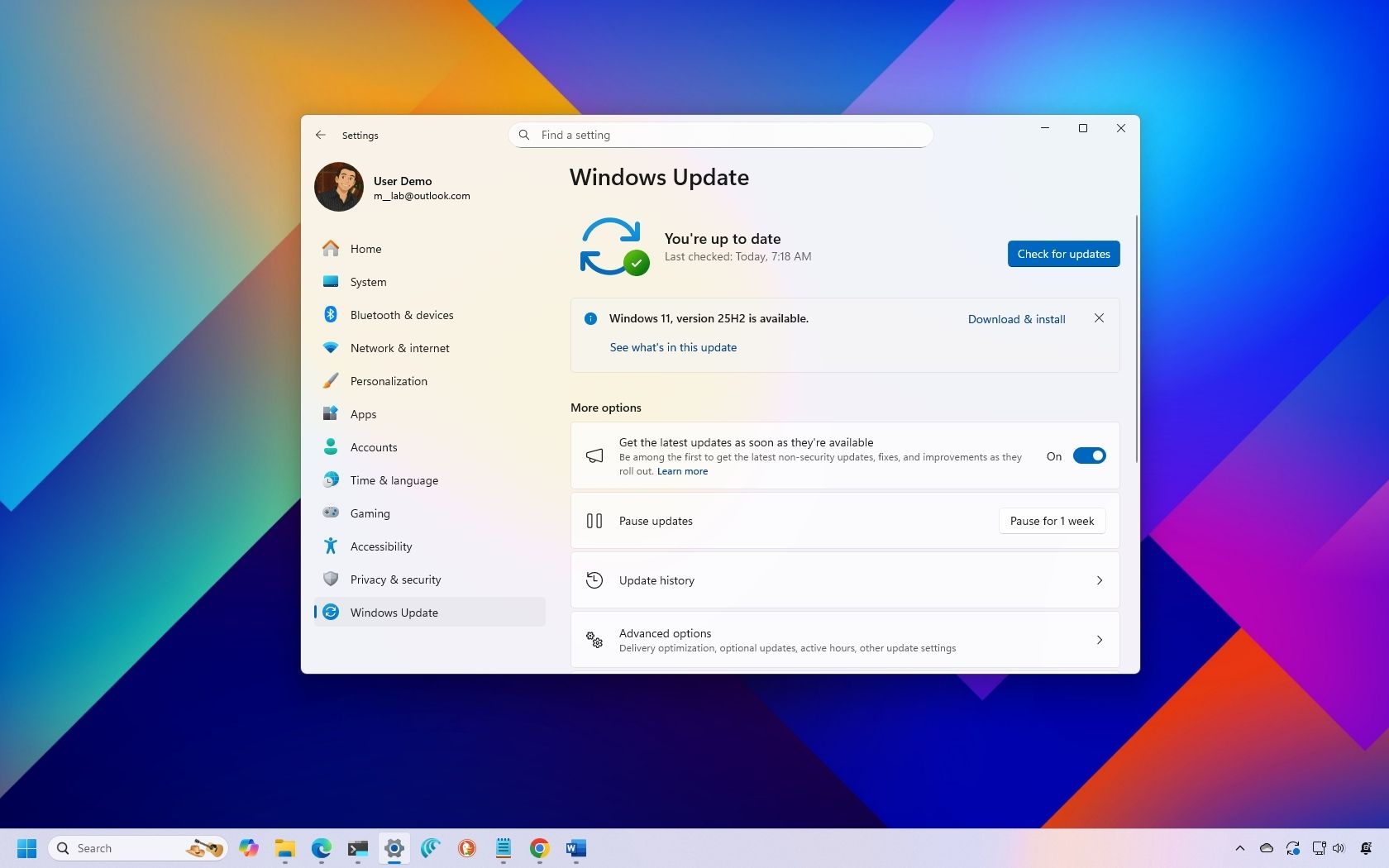
    Windows Update

    The easiest way to install version 25H2 is to trigger the download manually through update settings. You can do this from the “Windows Update” settings by turning on the “Get the latest updates as soon as they’re available” toggle switch and using the “Check for updates” option to force the upgrade.

    (Image credit: Mauro Huculak)

    Installation Assistant

    The Installation Assistant is a tool that allows you to update to the latest version when the system’s mechanism isn’t working. However, anyone can install version 25H2 on a computer as it becomes available.

    After the tool becomes available for Windows 11 2025 Update, click the “Download Now” button to download the tool from this Microsoft support website. Once you have the utility, simply launch the installer and click the “Accept and install” button.
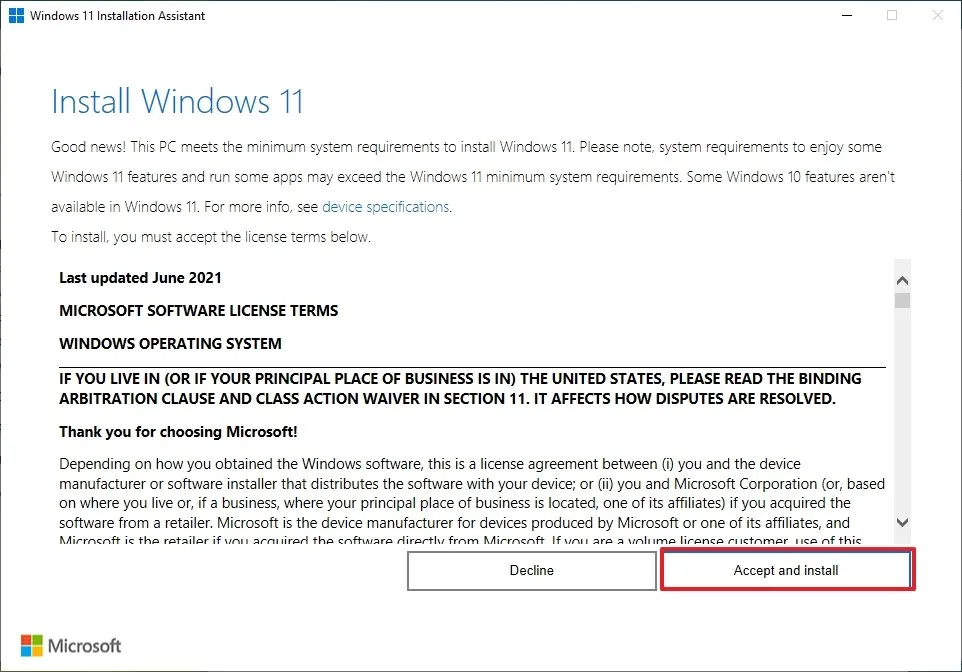
    Windows 11 Installation Assistant

    (Image credit: Mauro Huculak)

    Official ISO file

    The third option involves mounting the ISO with the installation files on File Explorer to launch the same setup experience as when using a USB flash drive.

    You can download the Windows 11 2025 Update ISO file from the Microsoft support website, located under the “Download Windows 11 Disk Image (ISO) for x64 devices” section, by clicking the “Download” button.

    Windows 11 ISO setup

    (Image credit: Mauro Huculak)

    More resources

    Explore more in-depth how-to guides, troubleshooting advice, and essential tips to get the most out of Windows 11 and 10. Start browsing here:


    Click to follow Windows Central on Google News

    Follow Windows Central on Google News to keep our latest news, insights, and features at the top of your feeds!

    25H2 version Windows
    Share. Facebook Twitter Pinterest LinkedIn Tumblr Email
    Previous ArticleBest Christmas Gifts 2025: 55 Ideas to Clear Your Holiday List
    Next Article Microsoft thwarted phishing campaign after detecting AI-generated code inside malicious attachments
    techupdateadmin
    • Website

    Related Posts

    Gadgets

    Your next Legion Go 2 might run SteamOS instead of Windows 11

    December 21, 2025
    Gadgets

    Microsoft makes theming your Windows 11 PC as easy as phones, but not as much fun

    December 15, 2025
    Mobile

    Running Android apps on your Windows 11 PC is about to feel slightly better

    December 12, 2025
    Add A Comment
    Leave A Reply Cancel Reply

    Top Posts

    NYT Strands hints and answers for Monday, August 11 (game #526)

    August 11, 202545 Views

    These 2 Cities Are Pushing Back on Data Centers. Here’s What They’re Worried About

    September 13, 202542 Views

    Today’s NYT Connections: Sports Edition Hints, Answers for Sept. 4 #346

    September 4, 202540 Views
    Stay In Touch
    • Facebook
    • YouTube
    • TikTok
    • WhatsApp
    • Twitter
    • Instagram
    Latest Reviews

    Subscribe to Updates

    Get the latest tech news from FooBar about tech, design and biz.

    Most Popular

    Best Fitbit fitness trackers and watches in 2025

    July 9, 20250 Views

    There are still 200+ Prime Day 2025 deals you can get

    July 9, 20250 Views

    The best earbuds we’ve tested for 2025

    July 9, 20250 Views
    Our Picks

    My Health Anxiety Means I Won’t Use Apple’s or Samsung’s Smartwatches. Here’s Why

    December 22, 2025

    You can now buy the OnePlus 15 in the US and score free earbuds if you hurry

    December 22, 2025

    Today’s NYT Connections: Sports Edition Hints, Answers for Dec. 22 #455

    December 22, 2025

    Subscribe to Updates

    Get the latest creative news from FooBar about art, design and business.

    Facebook X (Twitter) Instagram Pinterest
    • About Us
    • Contact us
    • Privacy Policy
    • Disclaimer
    • Terms and Conditions
    © 2026 techupdatealert. Designed by Pro.

    Type above and press Enter to search. Press Esc to cancel.