
Close Menu
TechUpdateAlert

    Subscribe to Updates

    Get the latest creative news from FooBar about art, design and business.

    What's Hot

    My Health Anxiety Means I Won’t Use Apple’s or Samsung’s Smartwatches. Here’s Why

    December 22, 2025

    You can now buy the OnePlus 15 in the US and score free earbuds if you hurry

    December 22, 2025

    Today’s NYT Connections: Sports Edition Hints, Answers for Dec. 22 #455

    December 22, 2025
    Facebook X (Twitter) Instagram
    Trending
    • My Health Anxiety Means I Won’t Use Apple’s or Samsung’s Smartwatches. Here’s Why
    • You can now buy the OnePlus 15 in the US and score free earbuds if you hurry
    • Today’s NYT Connections: Sports Edition Hints, Answers for Dec. 22 #455
    • Android might finally stop making you tap twice for Wi-Fi
    • Today’s NYT Mini Crossword Answers for Dec. 22
    • Waymo’s robotaxis didn’t know what to do when a city’s traffic lights failed
    • Today’s NYT Wordle Hints, Answer and Help for Dec. 22 #1647
    • You Asked: OLED Sunlight, VHS on 4K TVs, and HDMI Control Issues
    Facebook X (Twitter) Instagram Pinterest Vimeo
    TechUpdateAlertTechUpdateAlert
    • Home
    • Gaming
    • Laptops
    • Mobile
    • Software
    • Reviews
    • AI & Tech
    • Gadgets
    • How-To
    TechUpdateAlert
    Home»Gadgets»Logitech’s MX Master 4 adds haptic feedback, mostly just for fun
    Gadgets

    Logitech’s MX Master 4 adds haptic feedback, mostly just for fun

    techupdateadminBy techupdateadminSeptember 30, 2025No Comments4 Mins Read
    Share Facebook Twitter Pinterest LinkedIn Tumblr Reddit Telegram Email
    Logitech’s MX Master 4 adds haptic feedback, mostly just for fun
    Share
    Facebook Twitter LinkedIn Pinterest Email

    If you saw the leaks, you probably already know that haptics are the big, new thing in Logitech’s $119.99 MX Master 4 wireless mouse, coming in October. No, it’s not adding rumble effects to YouTube videos or to your favorite websites (on second thought, I’d like to try that). And, it’s different from Logitech’s haptics-based click system in its Pro X2 Superstrike gaming mouse coming in 2026.

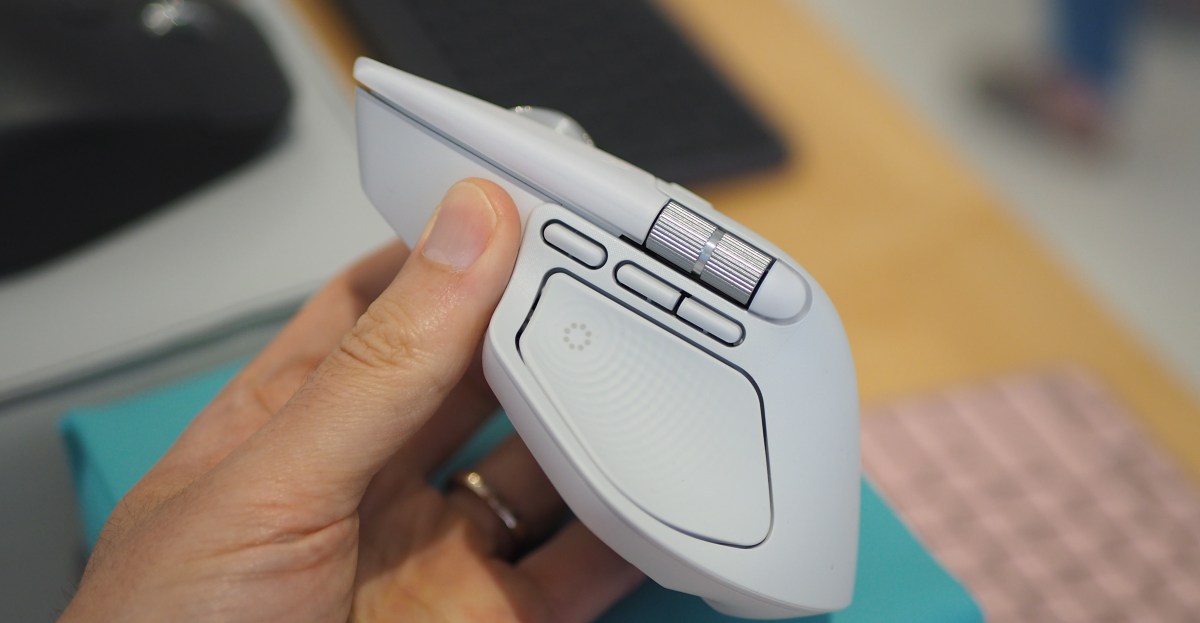
    The Haptic Sense Panel embedded in its grippy thumb rest vibrates when pressed, opening Logitech’s Action Ring overlay. That overlay can be filled with whatever app- and system-level shortcuts you want. You can even nest multiple Action Rings within one, if you want, letting you drill down to extremely specific commands. The haptics is a hardware feature that, unsurprisingly, requires you to engage pretty heavily with the company’s software, Logi Options Plus.

    The haptics punctuate every engagement you make with Logitech’s features, from gestures and Action Rings to its Smart Actions (pre-made or custom macros to automate certain tasks). My favorite use case for the haptics was one that’s switched off by default; you can enable a setting that provides a small jolt of haptic feedback when you move between screens, reducing the amount of “where on earth is my cursor?” moments each day.

    Image: Logitech via The Verge

    Before digging into the app integration, it’s worth sharing what’s new about the MX Master 4 itself. It has frosted, semi-transparent main buttons that add in a dash of elegance. Some people might be happy to hear that this model includes a USB-C Bolt transmitter, which the other compatible Logitech products (including the new Signature Slim Solar Plus keyboard) can connect to as well.

    In terms of battery life, Logitech claims it can last up to 70 days on a full charge (although, setting haptics to “high” intensity in the app will yield a shorter lifespan per charge).

    Lastly, its gesture button has moved from the thumb grip, where it was in the MX Master 3S from 2022, to a dedicated button next to the other two thumb buttons, just below the horizontal scroll wheel. When held, you then move the mouse in a cardinal direction to execute a desired action.

    Back to the app, Logitech bills the Action Ring as a time-saving feature, an alternative to keyboard shortcuts and moving your cursor across the screen to click something. You don’t have to be a power user to get a lot out of this functionality. For instance, I programmed an Action Ring with a button that auto-launches The Verge, and one that opens WordPress, where we produce articles. There are plugins within Logitech’s app for many third-party apps. Affinity Photo has a version of the Action Ring that appears when I press the Haptic Sense Panel while using the app. It shows some commands that I’m likely to take advantage of, like showing line guides to properly align objects, or simpler stuff like copying and pasting assets.

    To be clear, Action Rings aren’t new. The haptic sensations derived from navigating them, on the other hand, are. Clicking the haptics button makes it jolt, as does moving the cursor between the Action Ring’s bubbles. It’s a small, but delightful touch that I appreciate — that is, when I use Action Rings, which I still haven’t trained my brain to rely on when I’m in a flow state at work. I’m sorry to my employer, Vox Media, for all of the time I wasted at work when I could have used Action Rings to enhance my productivity!

    With haptics being the main new hardware feature in the MX Master 4, I don’t necessarily think it’s worth upgrading to if you have the MX Master 3S, as it’s similar in many ways. But it’s certainly worth getting instead of the 3S if you’re shopping for a mouse, since the 4 is launching at the same $119.99 price that its predecessor sells for. And, as for those who haven’t used an MX Master-series mouse before, it’s hard to overstate the value of an ergonomically-friendly mouse with a stellar scroll wheel, quiet clicks, and solid battery life. Haptics are just a nice add-on.

    Follow topics and authors from this story to see more like this in your personalized homepage feed and to receive email updates.

    • Cameron Faulkner

      Cameron Faulkner

      Cameron Faulkner

      Posts from this author will be added to your daily email digest and your homepage feed.

      See All by Cameron Faulkner

    • Gadgets

      Posts from this topic will be added to your daily email digest and your homepage feed.

      See All Gadgets

    • Logitech

      Posts from this topic will be added to your daily email digest and your homepage feed.

      See All Logitech

    • News

      Posts from this topic will be added to your daily email digest and your homepage feed.

      See All News

    • Tech

      Posts from this topic will be added to your daily email digest and your homepage feed.

      See All Tech

    adds Feedback Fun Haptic Logitechs Master
    Share. Facebook Twitter Pinterest LinkedIn Tumblr Email
    Previous ArticleLosing your phone on a trip? Brutal. Not doing these 3 things first? Security nightmare
    Next Article AI accountability: building secure software in the age of automation
    techupdateadmin
    • Website

    Related Posts

    Gadgets

    My Health Anxiety Means I Won’t Use Apple’s or Samsung’s Smartwatches. Here’s Why

    December 22, 2025
    Gadgets

    You can now buy the OnePlus 15 in the US and score free earbuds if you hurry

    December 22, 2025
    Gadgets

    Today’s NYT Connections: Sports Edition Hints, Answers for Dec. 22 #455

    December 22, 2025
    Add A Comment
    Leave A Reply Cancel Reply

    Top Posts

    NYT Strands hints and answers for Monday, August 11 (game #526)

    August 11, 202545 Views

    These 2 Cities Are Pushing Back on Data Centers. Here’s What They’re Worried About

    September 13, 202542 Views

    Today’s NYT Connections: Sports Edition Hints, Answers for Sept. 4 #346

    September 4, 202540 Views
    Stay In Touch
    • Facebook
    • YouTube
    • TikTok
    • WhatsApp
    • Twitter
    • Instagram
    Latest Reviews

    Subscribe to Updates

    Get the latest tech news from FooBar about tech, design and biz.

    Most Popular

    Best Fitbit fitness trackers and watches in 2025

    July 9, 20250 Views

    There are still 200+ Prime Day 2025 deals you can get

    July 9, 20250 Views

    The best earbuds we’ve tested for 2025

    July 9, 20250 Views
    Our Picks

    My Health Anxiety Means I Won’t Use Apple’s or Samsung’s Smartwatches. Here’s Why

    December 22, 2025

    You can now buy the OnePlus 15 in the US and score free earbuds if you hurry

    December 22, 2025

    Today’s NYT Connections: Sports Edition Hints, Answers for Dec. 22 #455

    December 22, 2025

    Subscribe to Updates

    Get the latest creative news from FooBar about art, design and business.

    Facebook X (Twitter) Instagram Pinterest
    • About Us
    • Contact us
    • Privacy Policy
    • Disclaimer
    • Terms and Conditions
    © 2026 techupdatealert. Designed by Pro.

    Type above and press Enter to search. Press Esc to cancel.