


Phones are an integral part of our lives, and ensuring they have a stable internet connection is crucial.
Everyone has a carrier they use. Sometimes that connection may not be as reliable as we hope. Even if they are one of the best phone carriers, that doesn’t mean they have the best coverage in your area.
If you want to change phone plans, check if your current phone is compatible with the network you’re considering. Otherwise, you may need to get a new one.
Our guide helps determine if your phone is carrier-locked or not, and what you can do with it if it’s not.
Related
6 reasons why you should still buy a phone with a physical SIM slot
Don’t be quick to buy eSIM-only phones
What are carrier-locked phones?
Carrier-locked phones are devices that can only work on a specific network, like AT&T, Verizon, or T-Mobile. If you purchased your phone through a carrier, it may be unlocked.
There are a few reasons carriers lock phones to their networks:
- You’re a new subscriber. Verizon and AT&T lock phones for 60 days after purchase. T-Mobile locks phones for 40 days after purchase. If you use a prepaid carrier, you’ll want to check its requirements for unlocking phones, as they’re all a little different.
- Your account has a past due balance. If you’re a new subscriber who cancels their account within the first month, you’ll need to pay any remaining fees before your phone is unlocked.
- You financed your phone through your carrier. You’ll need to pay the outstanding balance on your phone before it is unlocked.
- You took advantage of promotional pricing or a carrier trade-in incentive. In general, you’ll need to pay any outstanding balance as well as any promotional discounts before a carrier will unlock your device, but you’ll want to check your contract.
- Your device was reported lost, stolen, or blocked.
This is, by no means, an exhaustive list. Carriers frequently update their requirements.
Your best course of action is to review your contract. The contract will outline the requirements for your device to be unlocked.
Being unlocked doesn’t guarantee that your phone will be compatible with any network. Your device can be used on any network with which it’s compatible.
There are ways to unlock a phone by removing the carrier lock. However, this varies by carrier and typically involves being with the carrier for a specific period or paying off your phone.
Now that we know what having a locked vs. unlocked phone means, let’s look at how to check the status of your phone.
Use a SIM card to check if your phone is unlocked

The most foolproof way to determine if your phone is carrier locked is by trying a SIM card from a carrier that uses a different network. Many carriers have free trials where you can order a SIM to try this out.
- Make sure your current SIM is working by giving someone a call and sending a text.
- Power off your phone.
- Remove your current SIM card and swap it with a SIM card from another carrier.
- Power your phone back on.
- See if you can make a phone call or send a text.
If you can successfully send a text or make a call, your phone is unlocked. If you can’t make a call or send a text, then your phone is likely carrier locked.
You may also see a message saying, “SIM card not supported,” which means the phone is not unlocked.

Related
eSIMs were supposed to be the future — so why do they feel like a scam
The big eSIM promise is turning into a downgrade
Check your phone’s Settings app
If you don’t want to swap out your SIM card, use the Settings app to see if your phone is unlocked.
The steps are different for Android phones and iPhones. They may also vary by version and model.
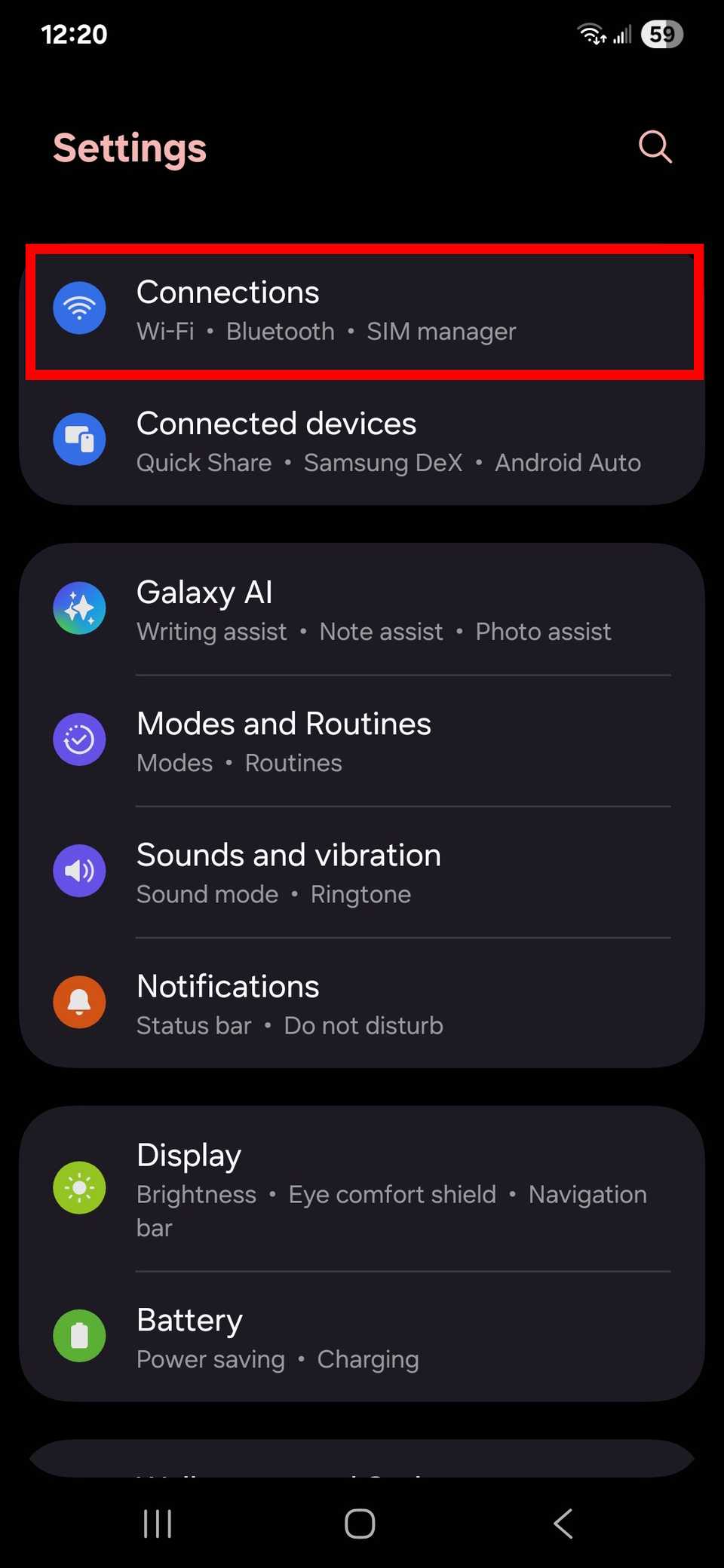
- Open the Settings app.
- Go to the Network & Internet, Connections, or a similarly labeled section.
-
Select the Mobile network, Cellular network, or something labeled similarly.
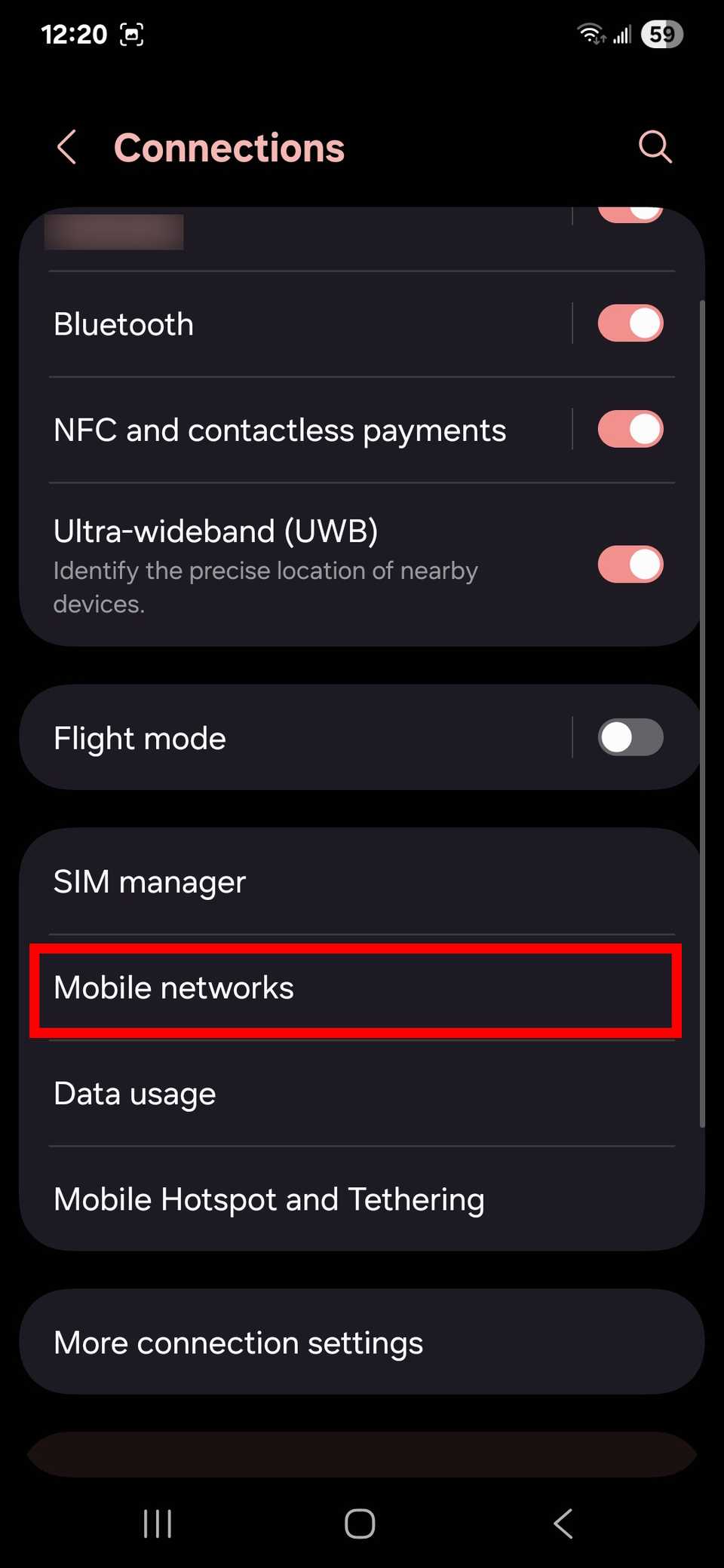
- Tap Advanced, Network operators, or something similar.
-
Toggle off the Select automatically, Choose network, or a similarly named toggle.
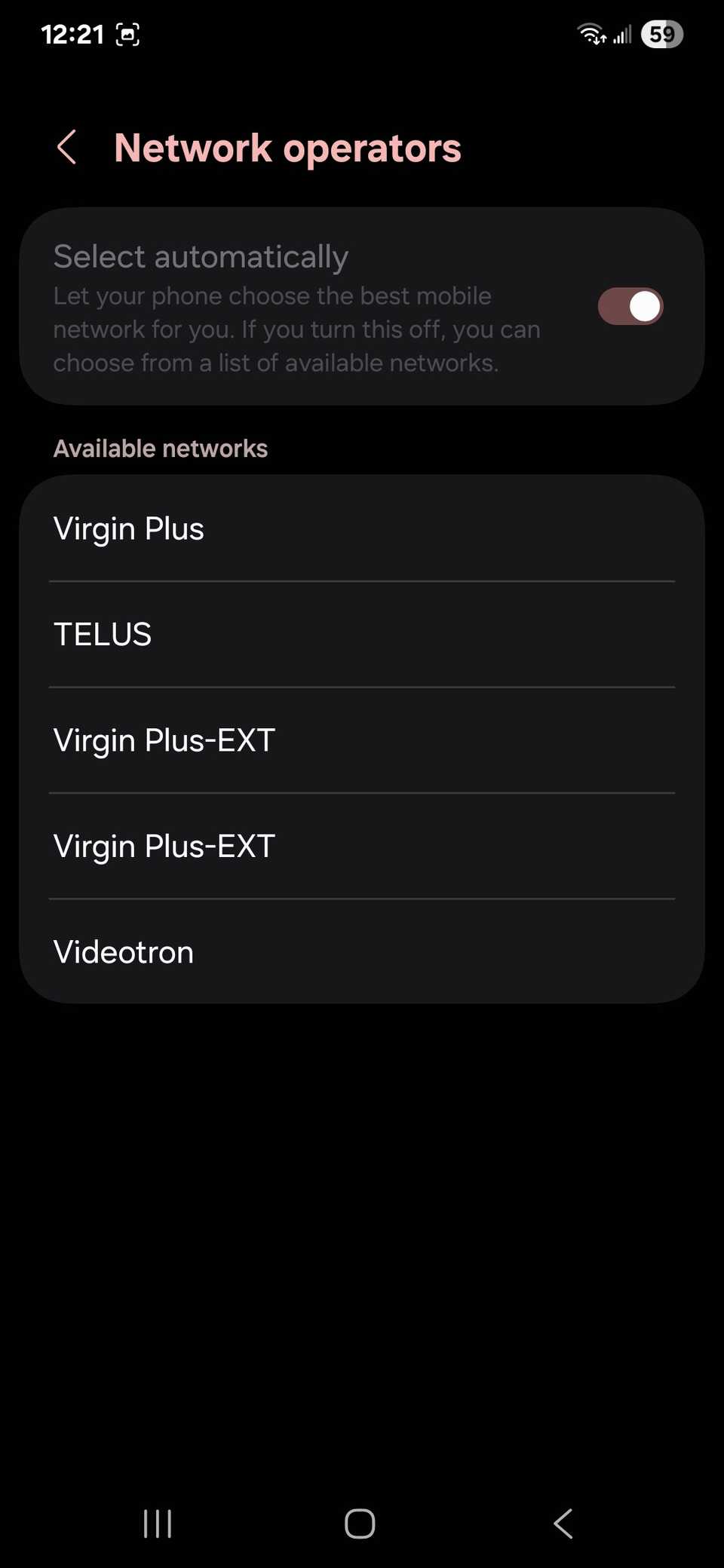


If you see a list of carriers pop up when your phone searches for networks, your phone is unlocked. If you only see the name of your current carrier, your phone is carrier locked.
Check your iPhone settings to see if your device is locked
If you have an iPhone, follow these steps:
- Launch the Settings app.
- Tap the General section.
- Select About.
- Scroll down until you see Carrier lock.
If you see “No SIM restrictions,” your phone is unlocked. However, if you see something else in that section, your phone is carrier locked.
Use your phone’s IMEI to see if it’s locked
Each phone has a unique identifier number called an IMEI for each available SIM slot. You can use this number to see if your phone is unlocked.
-
Obtain your phone’s IMEI number through the Settings app or from your phone’s box.
-
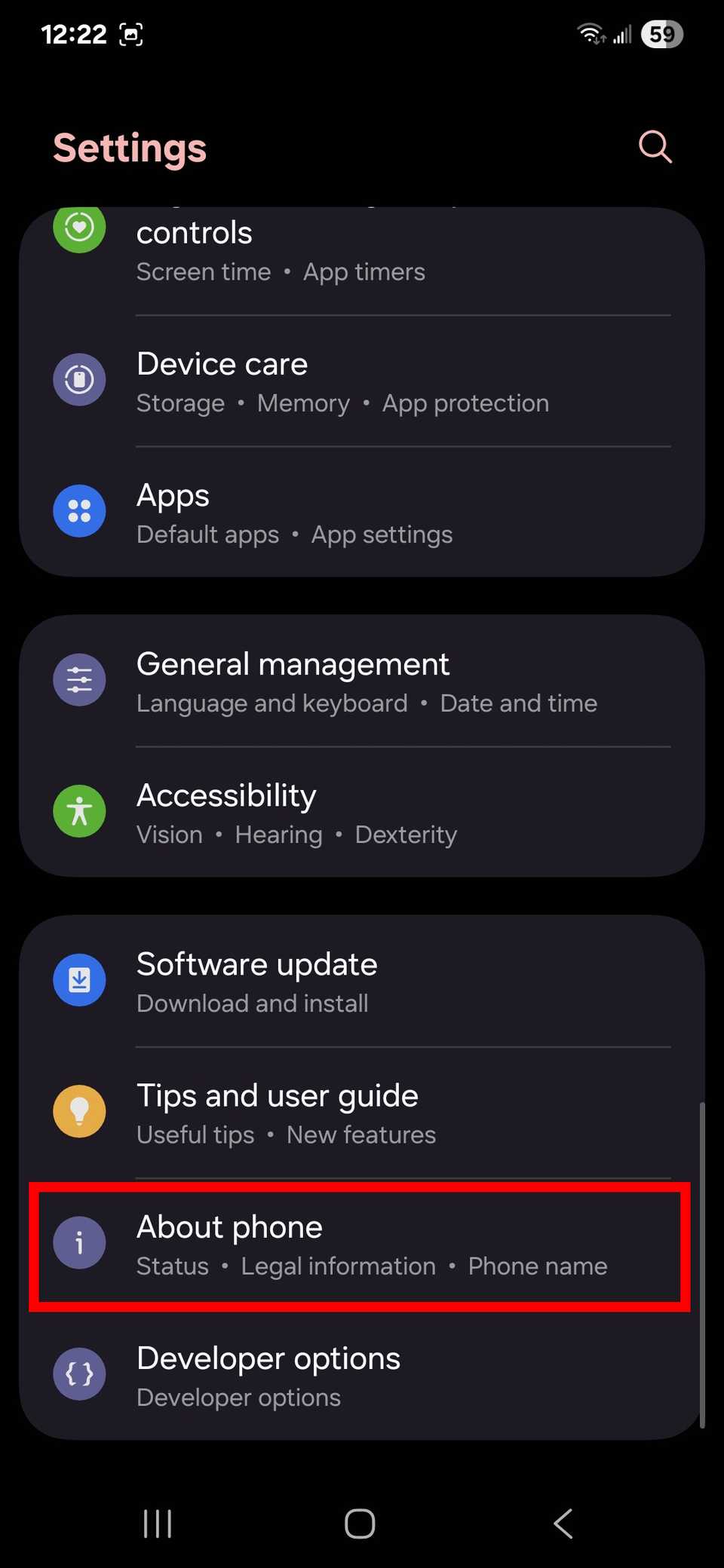
On an Android phone, go to the About phone section of Settings to find your IMEI. Alternatively, dial *#06# into your Phone app to bring up IMEI information.
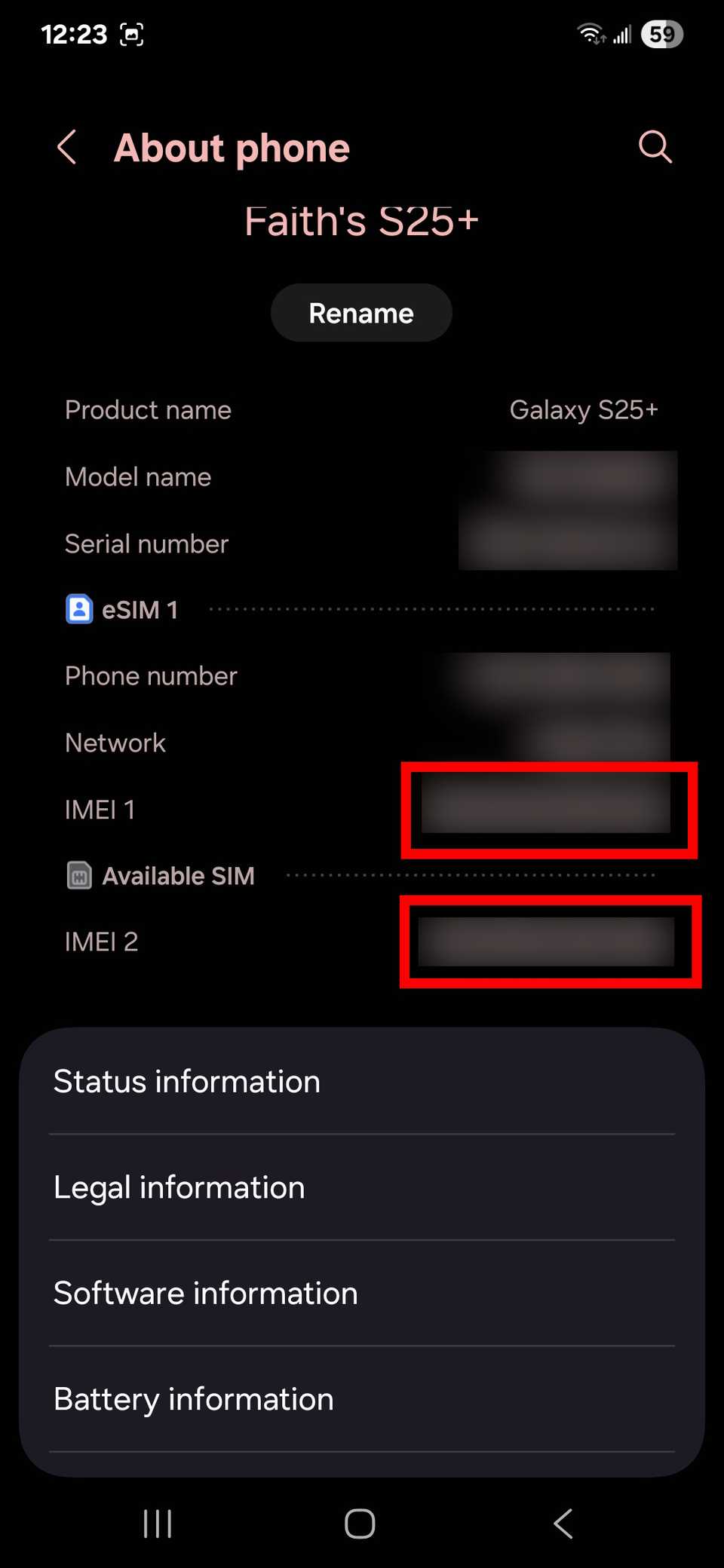
- On an iPhone, go to General in the Settings app and tap About phone. Your phone’s IMEI will be listed here.
-
On an Android phone, go to the About phone section of Settings to find your IMEI. Alternatively, dial *#06# into your Phone app to bring up IMEI information.
- Go to an IMEI checker such as IMEI.info, IMEI24, or IMEICheck. Alternatively, go to a carrier’s website and sign up for service while selecting to bring your own device.
- Enter your phone’s IMEI number and search.


Any of these sites will tell you if your phone is unlocked or compatible with their network.

Related
The best secret short codes for your Android phone
Unlock hidden features on your Android phone with these secret codes
Contact your current carrier if you don’t want to do these methods. Call, chat, or email them and ask their customer service if your phone is unlocked. They should be able to tell you.

Unlock all the best possibilities
Switching your carrier can help fix network issues or save you money. To make the switch, check if your current phone is carrier locked or not.
Plus, switching carriers may lead to free phone deals or better savings on your new plan.
