
Close Menu
TechUpdateAlert

    Subscribe to Updates

    Get the latest creative news from FooBar about art, design and business.

    What's Hot

    My Health Anxiety Means I Won’t Use Apple’s or Samsung’s Smartwatches. Here’s Why

    December 22, 2025

    You can now buy the OnePlus 15 in the US and score free earbuds if you hurry

    December 22, 2025

    Today’s NYT Connections: Sports Edition Hints, Answers for Dec. 22 #455

    December 22, 2025
    Facebook X (Twitter) Instagram
    Trending
    • My Health Anxiety Means I Won’t Use Apple’s or Samsung’s Smartwatches. Here’s Why
    • You can now buy the OnePlus 15 in the US and score free earbuds if you hurry
    • Today’s NYT Connections: Sports Edition Hints, Answers for Dec. 22 #455
    • Android might finally stop making you tap twice for Wi-Fi
    • Today’s NYT Mini Crossword Answers for Dec. 22
    • Waymo’s robotaxis didn’t know what to do when a city’s traffic lights failed
    • Today’s NYT Wordle Hints, Answer and Help for Dec. 22 #1647
    • You Asked: OLED Sunlight, VHS on 4K TVs, and HDMI Control Issues
    Facebook X (Twitter) Instagram Pinterest Vimeo
    TechUpdateAlertTechUpdateAlert
    • Home
    • Gaming
    • Laptops
    • Mobile
    • Software
    • Reviews
    • AI & Tech
    • Gadgets
    • How-To
    TechUpdateAlert
    Home»Software»You can turn off iOS 26’s obtrusive new screenshot previews
    Software

    You can turn off iOS 26’s obtrusive new screenshot previews

    techupdateadminBy techupdateadminSeptember 18, 2025No Comments2 Mins Read
    Share Facebook Twitter Pinterest LinkedIn Tumblr Reddit Telegram Email
    You can turn off iOS 26’s obtrusive new screenshot previews
    Share
    Facebook Twitter LinkedIn Pinterest Email

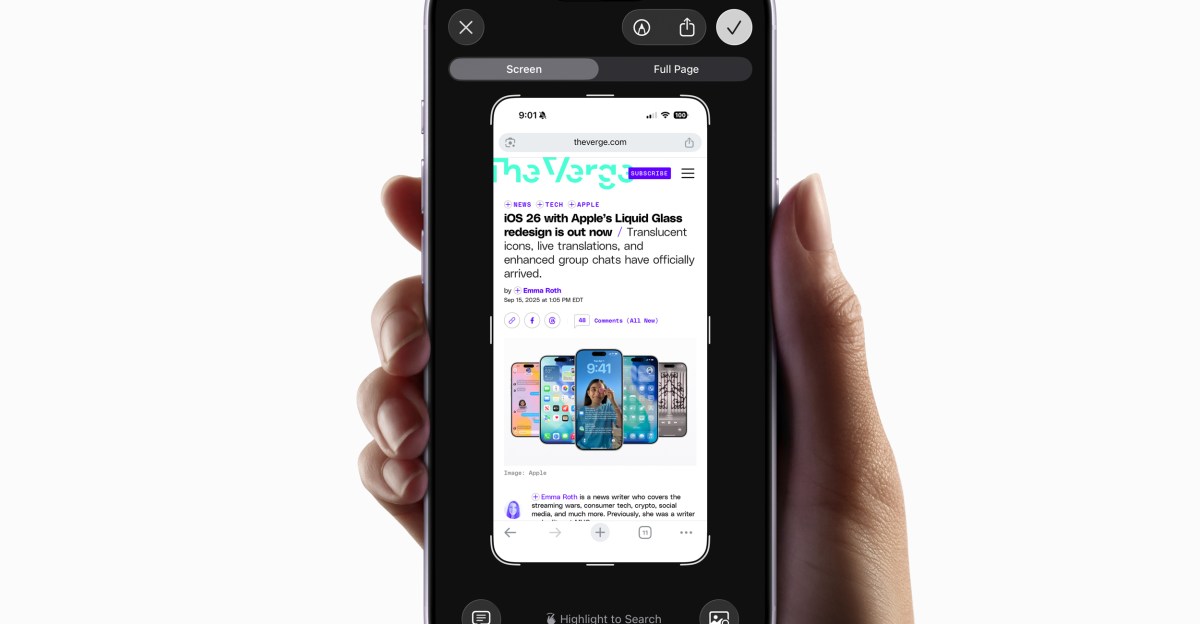
    One of the many unpublicized changes introduced with the iOS 26 update released earlier this week is that screenshots now automatically open into a full-screen preview. The new approach provides immediate access to a handful of useful tools for editing a screenshot, but they now dominate your iPhone’s screen when captured, instead of shrinking into an unobtrusive thumbnail. Thankfully, reverting to the old way iOS handled screenshots is easy, as spotted by 9To5Mac.

    Open your iPhone’s Settings app and then navigate to General > Screen Capture. There you’ll find a Full-Screen Previews toggle at the top of the page you can turn off. iOS says this option will “display screenshots in full view instead of showing a temporary thumbnail in the lower-left corner,” so disabling it will make screenshots much less obtrusive after they’ve been captured.

    Turning the feature off doesn’t do away with the full-screen previews entirely. After you’ve snapped a screenshot you can still tap its temporary thumbnail to bring up the screenshot interface again where you can crop or annotate it, search for similar images using Google, have ChatGPT provide more details about its contents, or get a summary of any text using Apple Intelligence. When snapping a webpage, the screenshot interface also includes tools for grabbing just what’s visible on screen, or the entire page.

    26s iOS obtrusive Previews Screenshot Turn
    Share. Facebook Twitter Pinterest LinkedIn Tumblr Email
    Previous ArticleiOS 26 Took Away Safari Features I’ve Used Since 2007. Here’s How to Get Them Back
    Next Article Support for Office 2016 and 2019 ends in a few weeks. Here are your options
    techupdateadmin
    • Website

    Related Posts

    Mobile

    What You Need to Play Red Dead Redemption on iOS and Android

    December 19, 2025
    Mobile

    NotebookLM can turn your messy data into structured tables for Google Sheets

    December 19, 2025
    Gadgets

    Facebook’s wants to turn basic link sharing into a paid feature

    December 18, 2025
    Add A Comment
    Leave A Reply Cancel Reply

    Top Posts

    NYT Strands hints and answers for Monday, August 11 (game #526)

    August 11, 202545 Views

    These 2 Cities Are Pushing Back on Data Centers. Here’s What They’re Worried About

    September 13, 202542 Views

    Today’s NYT Connections: Sports Edition Hints, Answers for Sept. 4 #346

    September 4, 202540 Views
    Stay In Touch
    • Facebook
    • YouTube
    • TikTok
    • WhatsApp
    • Twitter
    • Instagram
    Latest Reviews

    Subscribe to Updates

    Get the latest tech news from FooBar about tech, design and biz.

    Most Popular

    Best Fitbit fitness trackers and watches in 2025

    July 9, 20250 Views

    There are still 200+ Prime Day 2025 deals you can get

    July 9, 20250 Views

    The best earbuds we’ve tested for 2025

    July 9, 20250 Views
    Our Picks

    My Health Anxiety Means I Won’t Use Apple’s or Samsung’s Smartwatches. Here’s Why

    December 22, 2025

    You can now buy the OnePlus 15 in the US and score free earbuds if you hurry

    December 22, 2025

    Today’s NYT Connections: Sports Edition Hints, Answers for Dec. 22 #455

    December 22, 2025

    Subscribe to Updates

    Get the latest creative news from FooBar about art, design and business.

    Facebook X (Twitter) Instagram Pinterest
    • About Us
    • Contact us
    • Privacy Policy
    • Disclaimer
    • Terms and Conditions
    © 2026 techupdatealert. Designed by Pro.

    Type above and press Enter to search. Press Esc to cancel.