


Pros
- High-end gaming performance
- Manages heat and noise well
- Upgradeable RAM and 3x SSD slots
Cons
- Big and heavy
- Short battery life
- LCD screen doesn’t have great contrast
The Alienware 16 Area-51 sets the stage for Alienware’s new flagship laptop design. It certainly provides some intrigue with its looks, is quite potent and it operates without too much noise. However, thick bezels, large dimensions and considerable heft don’t make it the best-designed system around (though it does put on a nice light show).
As you might expect, the 16 Area-51 does a great job running everyday tasks. Its CPU can compete with desktop PCs, and it boasts outstanding graphics performance for high-quality gaming (even if it’s not close to being on par with the desktop counterpart). The system even manages its heat well, getting it out and keeping it away from your hands. Battery life is predictably weak though, barely exceeding two hours.
All of it does come at a steep price though. My test configuration was what Dell lists as a $3,349 “estimated value,” but it quickly sublimates that to $2,849. While I can’t say I love the way Dell displays its pricing for the Alienware 16 Area-51, it’s a good thing it’s not closer to the “estimated value.” That would come way too close to the lighter, more compact Lenovo Legion Pro 7i 16 Gen 10. Lenovo has a knack for squeezing out all the performance it can from a gaming laptop. A knack Alienware hasn’t quite shown here. That said, while the Alienware 16 Area-51 is certainly a premium gaming laptop with the price to prove it, it’s a fair value for what’s on offer.
Alienware 16 Area-51 Specs
| Price as reviewed | $3,349 |
|---|---|
| Size | 14.37 x 11.41 x 1.12 in/365 x 290 x 28.5mm; 7.24 pounds |
| Display | 16-inch, 2560×1600, 240Hz, LCD, Nvidia G-Sync, 100% DCI-P3 |
| CPU | 2.7GHz Intel Core Ultra 9 275HX |
| Memory | 32GB (2x16GB) DDR5-6400 |
| Graphics | 16GB NVIDIA GeForce RTX 5080 Laptop |
| Storage | 1TB PM9C1a Samsung 1024GB |
| Networking | Intel Killer Wi-Fi 7 BE1750 802.11be, Bluetooth 5.4 |
| Connections | USB 3.2 Gen 1 Type-A (x3 rear), Thunderbolt 5 (x2 rear), 3.5mm audio connector (x1 left), HDMI 2.1 (x1 rear), SD card reader (x1 left) |
| Battery | 96Wh |
| Operating system | Windows 11 Home |
Dell has a few preconfigured models of the Alienware 16 Area-51 with a listed price of $2,999 to get a similar configuration to the one I tested but with an RTX 5070 Ti instead. As configured, my Area-51 has an “estimated value” of $3,349, though the aforementioned preconfigured model doesn’t include the mechanical keyboard mine has. Despite their newness, Dell had all configurations largely discounted at the time of testing, with the base model dropped to $2,549 and our test unit sitting at $2,849. It appears Dell has taken a page out of Lenovo’s book and started listing prices (the “estimated value”) it doesn’t intend to charge, so it can appear to be offering a deal on its true retail prices.
The aurora borealis-inspired lighting around the rear is new with this model.
Dell provides a custom configurator to allow you to mix and match the elements you want. This starts with a base of $1,849 that includes an Intel Core Ultra 7 255HX, an 8GB RTX 5060, 16GB of memory and 1TB of storage. Using the configurator to get our test setup, the price comes out to $2,849 (or $2,899 if you want the mechanical keyboard). Configurations can go even higher, with Dell offering an RTX 5090, 64GB of memory and as much as 12TB of storage by combining three 4TB SSDs.
Curiously, Dell offers two different screen options, but both are the same 2,560×1,600-resolution panel with stated 100% DCI-P3 coverage, 500 nit brightness, a 240Hz refresh rate and Nvidia G-Sync plus Advanced Optimus. The actual difference is the webcam: One is 4K while the other is 1080p.
Strong, but not pushing the limits
The Alienware 16 Area-51 has muscles to flex. It rocks a mighty CPU that puts up the kind of numbers even desktop PCs long for. In our Geekbench 6 test, the Alienware 16 Area-51’s Intel Core Ultra 9 275HX nearly showed up the AMD Ryzen 7 9800X3D as tested in the Velocity Micro Raptor Z95A desktop, with the Alienware actually pulling ahead in multicore speeds. It even came close to matching the Alienware Area-51 desktop’s speeds in this test, and that system was running a full Intel Core Ultra 9 285K with a 360mm liquid cooler. It was a similar story for the Cinebench test.
The backlit touchpad is still a highlight on Alienware’s laptops.
Processor performance like that is great to see, especially in a laptop, but the graphics chip lags well behind desktop counterparts. That’s not to say the RTX 5080 inside the Alienware 16 Area-51 isn’t strong, but the margin is much wider compared to the RTX 5080 you’d find in a desktop PC. In various 3DMark tests, the two desktops mentioned above achieved roughly 40% better performance than the Alienware 16 Area-51.
Of course, that just means you need to temper your expectations somewhat. The Alienware 16 Area-51 is still a mighty strong system. It ran all our 1080p gaming tests at over 140 frames per second, reaching 183fps in Guardians of the Galaxy and 207fps in Shadow of the Tomb Raider. However you won’t make the most of the Alienware 16 Area-51 at 1080p, as that sees it actually fall short of an RTX 4080-equipped Lenovo Legion Pro 716IRX9H. Instead, dialing up the resolution or graphics settings will let you take better advantage of the hardware’s potential.
The metal lid looks nice but seems to dent easily.
I was able to comfortably play through the opening hour of Indiana Jones and the Great Circleat 1080p with graphics at the highest preset, DLSS set to DLAA mode (i.e., no downsampling) and all ray-tracing effects maxed out. It wasn’t perfect, with exploration areas only hitting 30-40 frames per second and interiors sitting around 60-70 fps, but it was consistent, not seeing the brief drops to single digits that can really tank a gaming experience. The system fans were also not very loud despite the heavy load of the game, though Alienware’s Performance mode does push them to a more annoyingly loud level.
Speaking of heat, it’s managed fairly well. The Alienware 16 Area-51 ran 3DMark’s Steel Nomad Stress Test with 97.2% consistency, so it didn’t have to throttle back as the temperature climbed. Heat is also kept away from the gamer. I didn’t feel the system getting warm with my hand resting on the keyboard deck and fingers on the WASD keys. If you put your mouse too close to the side vents, though, you might feel the exhaust heat.
Battery performance isn’t quite as stellar as other aspects of the Alienware 16 Area-51. Leaving it up to the system, the Alienware 16 Area-51 didn’t seem to think it should fully deactivate the GPU when I was just using the Chrome browser. As a result, I was lucky to get over 2.5 hours of battery life running our streaming video drain test; you can expect even less while gaming. That’s not abnormal for a high-powered gaming laptop, but it’s not something to overlook, either.
Don’t look for the volume keys along the top row of function keys; they’re down the right side of the keyboard.
A looker that could have used some condensing
Alienware has long been one for distinct designs, and the Alienware 16 Area-51 is no exception. As soon as I pulled this beast out of the box, I said to myself, “What is going on here?” On one hand, the Alienware 16 Area-51 shares clear DNA with the Alienware x16 R2 that came before it. It bears a similarly curved design, the big rear shelf and it borrows the illuminated trackpad. It also has a large grille above the keyboard, though Alienware didn’t go with the honeycomb design of the x16 R2. In fact, the Alienware 16 Area-51 is smattered with grilles and vents. More interesting than all of them, however, is the window on the underside of the laptop.
A window to your components, or at least the fans that cool them.
This underside window gives a look right into a small section of the interior. It’s not a particularly engaging section, but it offers a peek at two of the four fans and a few ribbon connectors. Since it covers some of the space where a bottom grille would normally provide air intake for the fans, Dell has much of the air coming in through the grille above the keyboard. The window is on a little platform that itself has a small grille, allowing some extra air intake. There’s a second set of fans near the window that have their own bottom grille. All the air coming in gets blown out vents on the sides and rear of the laptop.
Dell has tucked two speakers on either side of the keyboard behind grilles of their own. But in addition to those two, there’s another set underneath the laptop, giving the Alienware 16 Area-51 a two-tweeter, two-woofer setup. More speakers don’t mean better sound though. Maxed out, the speakers weren’t very loud, and at higher volumes, they managed to break up a bit and sound harsh, especially with Dolby Atmos features enabled. They sound better dialed back a bit but still have a harshness from overdone high-frequency sounds.
The keyboard is curiously recessed as Dell has “pillowed” the lower part of the deck for ergonomics. I can’t say it feels bad, but I don’t think it feels any better for the pillowing. The more noticeable “feels” comes from the optional mechanical keyboard. You’ll hear that you’re using a mechanical keyboard, and if you use it in a quiet space, people are going to notice. It’s not loud like a set of Cherry MX Blues, but it is noticeable. Other than that, it’s a decent enough keyboard for quick typing, with a clear actuation and good stabilization. I was comfortable typing at over 100 words per minute, but I found I struggled to go much faster.
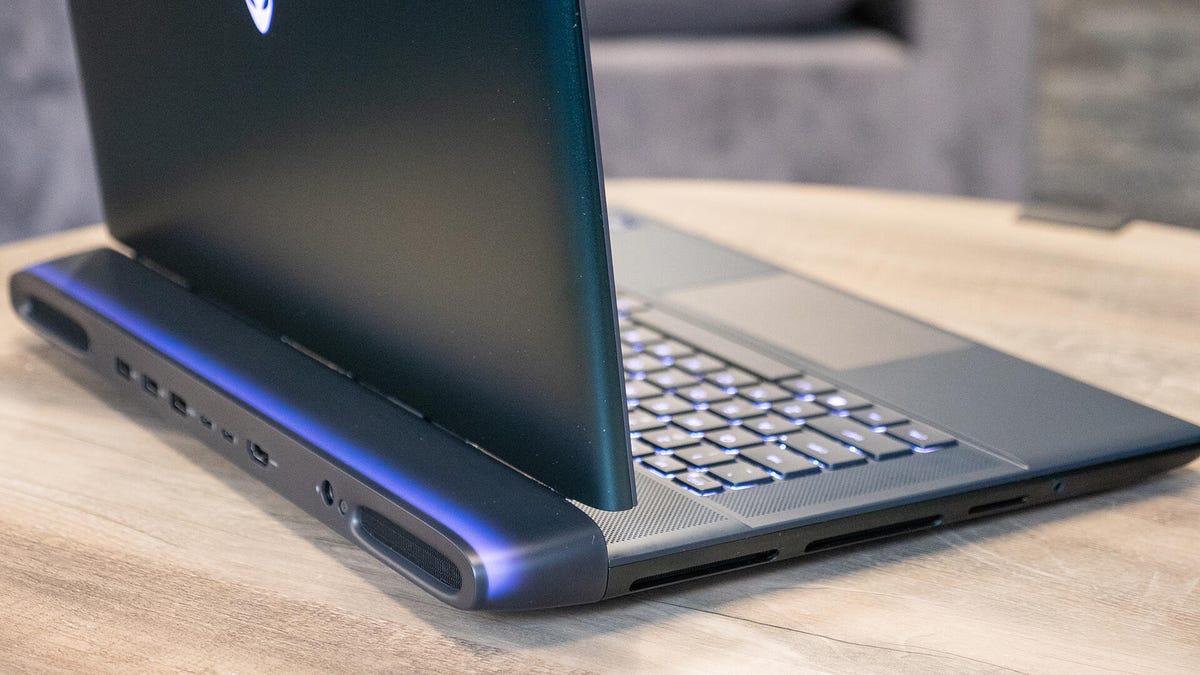
Most of the connections are at the back so bigger cables stay out of your way.
Despite the laptop’s size, the trackpad is actually fairly small since Dell pushed the keyboard down toward the front. It’s not tiny, but it would feel more at home on a 14 — or even 13-inch laptop.
The 16-inch screen is decent. It’s plenty sharp thanks to its 1600p resolution and seems smooth with its 240Hz refresh rate. Ghosting is faint enough that it’s easy to ignore, though some light inverse ghosting is more noticeable. However the contrast is a bit lacking. Plenty of other manufacturers opt for OLED panels, but Alienware didn’t. It may be just as colorful, but the shortcoming in contrast can make dark scenes in games less impressive.
The display hinge is also odd, sliding out on rails as the display opens up. This raises the display up ever so slightly and may help distract from the large-for-2025 bottom bezel. What it doesn’t distract from is the somewhat concerning amount of flexibility the display itself has.
Aside from the bendy display, the rest of the machine feels well-built. The keyboard deck is firm and has a plastic finish, while the lid and bottom come with a metallic green aluminum that looks a bit like a beetle shell. The thermal shelf in the rear is made of a translucent plastic that lets additional lighting shine through.
Alienware put most of the ports on that rear shelf. It’s a decent selection, with three USB 3.2 Gen 1 Type-A ports, two Thunderbolt 5 ports, an HDMI 2.1 output and a power connector for the beefy 350-watt power brick (side note: Dell used GaN tech in this brick, so it’s at least smaller and lighter than it could have been). On the left side of the laptop, you’ll also find a headset jack and a full-size SD card reader.
With all that Dell has going on here, this was naturally going to be a big and heavy laptop. But even then, it’s surprising just how big and heavy it is. It tips the scales at 7.2 pounds and measures an almost absurd 11.4 inches front to back. The 1.1-inch thickness isn’t stellar, but at least the 14.4-inch width is par for the course with 16-inch laptops.
While the size is a downside in and of itself, it does come with a perk. The interior has room for three M.2 solid-state drives, giving you plenty of upgrade potential. It also uses DDR5 modules — not onboard memory — which means if you want to upgrade to more memory down the line, you’ll be able to.
Is the Alienware 16 Area-51 worth it?
Generally speaking, the Alienware 16 Area-51 is an excellent 16-inch gaming laptop. Due to its size and weight, it is more of a desktop replacement than something you’ll want to travel with regularly. The display is a bit of a weak spot, and the option to swap it for an OLED would be nice, but it’s not a deal-breaker. Plus, its port assortment makes it easy to connect up to an external display and more. Its desktop-like processor performance is truly impressive; its GPU is less so, but it is still plenty powerful for a gaming laptop, and there is the option to pay for a faster 5090 chip. I also appreciate the lights and styling and the option to upgrade storage and RAM. Again, you might be paying a premium, but it’s a fair value for what’s on offer.
The review process for laptops, desktops, tablets and other computerlike devices consists of two parts: performance testing under controlled conditions in the CNET Labs and extensive hands-on use by our expert reviewers. This includes evaluating a device’s aesthetics, ergonomics and features. A final review verdict is a combination of both objective and subjective judgments.
The list of benchmarking software we use changes over time as the devices we test evolve. The most important core tests we’re currently running on every compatible computer include Primate Labs Geekbench 6, Cinebench R23, PCMark 10 and 3DMark Fire Strike Ultra.
A more detailed description of each benchmark and how we use it can be found on our How We Test Computers page.
Geekbench 6 CPU (multicore)
Alienware 16 Area-51 20043Lenovo Legion 5i 15IRX10 17711Asus ProArt P16 15377MSI Katana 15 HX B14W 14587Acer Swift X 14 13349Dell XPS 16 9640 12855Acer Nitro V 16S AI 12787
Geekbench 6 CPU (single-core)
Alienware 16 Area-51 3073Asus ProArt P16 2905Lenovo Legion 5i 15IRX10 2895MSI Katana 15 HX B14W 2738Acer Nitro V 16S AI 2607Acer Swift X 14 2402Dell XPS 16 9640 2226
Cinebench 2024 CPU (multicore)
Alienware 16 Area-51 2002Lenovo Legion 5i 15IRX10 1407MSI Katana 15 HX B14W 1220Asus ProArt P16 1188Acer Nitro V 16S AI 867Dell XPS 16 9640 793Acer Swift X 14 749
Cinebench 2024 CPU (single-core)
Alienware 16 Area-51 134Lenovo Legion 5i 15IRX10 121MSI Katana 15 HX B14W 117Asus ProArt P16 115Acer Swift X 14 106Dell XPS 16 9640 105Acer Nitro V 16S AI 104
PCMark 10 Pro Edition
Alienware 16 Area-51 8650Lenovo Legion 5i 15IRX10 8056Asus ProArt P16 7857Acer Nitro V 16S AI 7509MSI Katana 15 HX B14W 7024Acer Swift X 14 6774Dell XPS 16 9640 6667
3DMark Fire Strike Ultra
Alienware 16 Area-51 13504Lenovo Legion 5i 15IRX10 8015Asus ProArt P16 7530Acer Nitro V 16S AI 6413MSI Katana 15 HX B14W 6285Dell XPS 16 9640 5239Acer Swift X 14 4608
Shadow of the Tomb Raider (Highest @ 1920 x 1080)
Alienware 16 Area-51 207Lenovo Legion 5i 15IRX10 172MSI Katana 15 HX B14W 155Asus ProArt P16 150Acer Nitro V 16S AI 143Dell XPS 16 9640 109Acer Swift X 14 104
Guardians of the Galaxy (High @1920 x 1080)
Lenovo Legion 5i 15IRX10 195Alienware 16 Area-51 183MSI Katana 15 HX B14W 159Acer Nitro V 16S AI 133Acer Swift X 14 126Asus ProArt P16 124Dell XPS 16 9640 124
Online streaming battery drain test
Dell XPS 16 9640 11:42Asus ProArt P16 10:52Acer Swift X 14 8:28Acer Nitro V 16S AI 8:32MSI Katana 15 HX B14W 6:14Lenovo Legion 5i 15IRX10 5:25Alienware 16 Area-51 2:29
System configurations
| Alienware 16 Area-51 | Windows 11 Home; Intel Core Ultra 9 275HX; 32GB DDR5 3,200MHz RAM; NVIDIA GeForce RTX 5080 Laptop; 1TB PM9C1a Samsung |
|---|---|
| Asus ProArt P16 | Windows 11 Home; AMD Ryzen AI 9 HX 370; 32GB DDR5 5,600MHz RAM; Nvidia GeForce RTX 5070; 2TB SSD |
| MSI Katana 15 HX B14W | Windows 11 Home; Intel Core i7-14650HX; 16GB DDR5 5,600MHz RAM; Nvidia GeForce RTX 5050; 512GB SSD |
| Lenovo Legion 5i 15IRX10 | Windows 11 Home; Intel Core i7-14700HX; 32GB DDR5 5,600MHz RAM; Nvidia GeForce RTX 5060; 1TB SSD |
| Acer Nitro V 16S AI | Windows 11 Home; AMD Ryzen 7 260; 32GB DDR5 5,600MHz RAM; Nvidia GeForce RTX 5060; 1TB SSD |
| Acer Swift X 14 | Windows 11 Home; Intel Core 7 Ultra 155H; 32GB LPDDR5 6,400MHz RAM; 8GB Nvidia GeForce RTX 4070; 1TB SSD |
| Dell XPS 16 9640 | Windows 11 Home; Intel Core 7 Ultra 155H; 16GB DDR5 7,467MHz RAM; 8GB Nvidia GeForce RTX 4070; 1TB SSD |
