


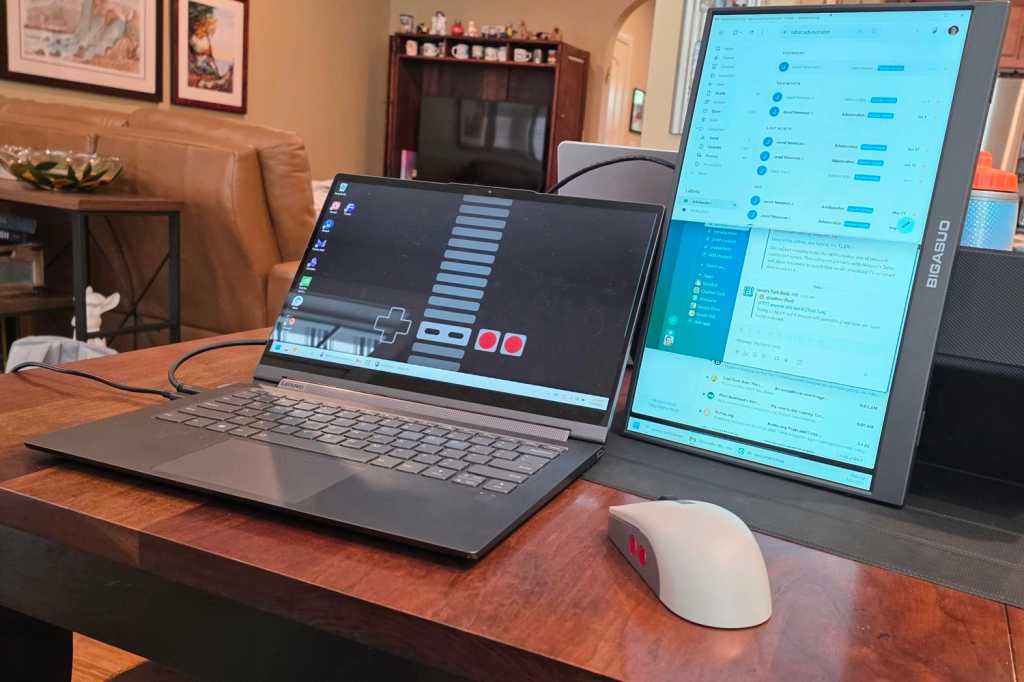
Greetings from Maryland, where I’m currently visiting family and using one of the best impulse buys I’ve made in recent memory. I’m taking about those cheap portable monitors that go on sale for about $50 on Amazon, available under a variety of unrecognizable brand names.
The one I got is made by BIGASUO (a name I can’t stop saying), but you can find seemingly identical models from the likes of FANGOR and MNN. They all serve the same basic purpose as a travel-friendly way to add an extra screen to your laptop, and they all have the same basic features:
- 15.6-inch 1080p display
- USB-C or Mini HDMI input
- Built-in speakers
- Audio jack for headphones or external speakers
- A detachable folio stand
Some variants, such as this one by the unfortunately named Dopesplay, have actual built-in kickstands instead of folio cases that double as makeshift stands, but otherwise appear identical.
Are these monitors great quality-wise? Of course not. But they’re cheap, light, and versatile. They’re also refreshingly free from a lot of modern tech baggage. I’ve had a great time finding ways to use mine. Allow me to convince you why you should get one of these, too.
This column first appeared in Advisorator, Jared’s weekly tech advice newsletter. Sign up to get tech advice like this every Tuesday.
How does a portable monitor work?
These portable screens work a little differently than full-sized monitors, mainly because they don’t have regular HDMI, DisplayPort, or VGA inputs. To connect these monitors, you have a couple options:
- USB-C to USB-C data cable. This provides power and video to the portable monitor through a single cable, but requires your computer to support video output through a USB-C port. (Modern Macs can do this, and many recent Windows laptops are catching up.)
- Mini HDMI to HDMI. For computers with HDMI outputs, you can send video to the portable monitor via Mini HDMI, but you’ll need a separate USB-C cable to power the monitor as well.
Jared Newman / Foundry
Note that these travel-friendly displays don’t have built-in batteries, so they must draw power from either your laptop or an outlet. The lack of a battery makes the monitor lighter, but if you’re using the USB-C to USB-C connector, you’ll likely want to keep your laptop plugged into its own power source for lengthy computing sessions.
My BIGASUO monitor included all the necessary cables, but they’re on the short side. To lengthen the connection distance, you’ll either need an HDMI extender or a USB-C to USB-C cable with 10 Gbps transfer speeds. (A basic USB-C charging cable won’t suffice for video connections.)
What is a portable monitor good for?
The most obvious use for a portable monitor is the main one: while using a laptop on the go, you can attach the portable monitor, prop it up with a stand, and have two screens instead of one.
If you’ve never used a dual monitor setup before, this can be a revelation in itself. It’s nice being able to reference a document on one screen while writing on the other, or use one screen just for things like email and Slack while freeing up the main screen for more important tasks.
I’ve also managed to prop up my BIGASUO monitor in portrait mode, which can be a bit precarious at times but does make my mobile workspace a bit more compact. (You can rotate the monitor orientation in system settings on both Windows PC and Mac.)
Beyond the dual-screen setup, I’ve also experimented with:
Turning a phone into a computer: Paired with a Bluetooth mouse and keyboard, your phone can become a makeshift portable desktop. Samsung’s Galaxy phones are especially well-suited with Samsung DeX, which launches a desktop-like environment when the phone connects to an external display. (You can even use the phone screen as a touchpad.) Plugging a separate USB-C charging cable into the monitor will send a charge back to the phone so you don’t waste battery life.

Jared Newman / Foundry
An extra (or alternate) desktop display: You don’t have to use a portable monitor on the road. I’ve been plugging mine into my desktop gaming PC in the basement while my son occupies the TV with the PlayStation 5. (We have plans to play Fortnite together this way but haven’t gotten around to it yet.)
A bigger portable video screen: I’ve connected the portable monitor to my Steam Deck for a bigger view of the action, and I can envision plugging it into a phone or tablet to watch movies in bed or on a plane.
A portable monitor just works
In the past, I’ve written about using a tablet as an external monitor—and that’s still a viable option. Portable monitors are larger than most tablets, though, and they’re also less finnicky to set up.
Not to get overly philosophical here, but portable monitors also remind me why I get excited about technology to begin with. Unlike so many other tech products today, a portable monitor is a no-fuss device that just works when you plug it in, asking nothing of you in exchange. There’s no pairing process, no login procedure, and no privacy policy to accept. I often hear folks pining for a dumb alternative to modern smart TVs—if you ask me, that idea is alive and well in portable monitors.
But the biggest endorsement I can offer is this: my wife, after borrowing my portable monitor a couple days ago, now wants one of her own.
This column first appeared in Advisorator, Jared’s weekly tech advice newsletter. Sign up to get tech advice like this every Tuesday.
