

Close Menu
TechUpdateAlert

    Subscribe to Updates

    Get the latest creative news from FooBar about art, design and business.

    What's Hot

    My Health Anxiety Means I Won’t Use Apple’s or Samsung’s Smartwatches. Here’s Why

    December 22, 2025

    You can now buy the OnePlus 15 in the US and score free earbuds if you hurry

    December 22, 2025

    Today’s NYT Connections: Sports Edition Hints, Answers for Dec. 22 #455

    December 22, 2025
    Facebook X (Twitter) Instagram
    Trending
    • My Health Anxiety Means I Won’t Use Apple’s or Samsung’s Smartwatches. Here’s Why
    • You can now buy the OnePlus 15 in the US and score free earbuds if you hurry
    • Today’s NYT Connections: Sports Edition Hints, Answers for Dec. 22 #455
    • Android might finally stop making you tap twice for Wi-Fi
    • Today’s NYT Mini Crossword Answers for Dec. 22
    • Waymo’s robotaxis didn’t know what to do when a city’s traffic lights failed
    • Today’s NYT Wordle Hints, Answer and Help for Dec. 22 #1647
    • You Asked: OLED Sunlight, VHS on 4K TVs, and HDMI Control Issues
    Facebook X (Twitter) Instagram Pinterest Vimeo
    TechUpdateAlertTechUpdateAlert
    • Home
    • Gaming
    • Laptops
    • Mobile
    • Software
    • Reviews
    • AI & Tech
    • Gadgets
    • How-To
    TechUpdateAlert
    Home»Laptops»I use public Wi-Fi despite the risks. Here’s how I keep safe
    Laptops

    I use public Wi-Fi despite the risks. Here’s how I keep safe

    techupdateadminBy techupdateadminSeptember 8, 2025No Comments3 Mins Read
    Share Facebook Twitter Pinterest LinkedIn Tumblr Reddit Telegram Email
    coffee cup
    Share
    Facebook Twitter LinkedIn Pinterest Email

    We’ve all heard about the risks of public Wi-Fi networks, which might make anyone want to avoid it altogether. In theory, that’s what I should do, but in practice, I still end up logging in occasionally. The main reason is convenience, especially when I’m traveling and don’t have access to my home network or a mobile hotspot. Knowing I’m taking a risk, I’m a bit more careful about securing my PC when using them. Here’s how I stay safe…

    1. Verify the network name and password

    Hackers often set up Wi-Fi networks with names very similar to the one you want to join, hoping victims will be fooled and join their insecure network instead. To avoid this, I always verify the exact network SSID and password with staff at the coffee shop or airport or wherever it is I’m connecting to public Wi-Fi before I try to connect. If staff have it written down, I double-check my info against theirs to be safe.

    2. Use a VPN

    I always use a VPN (Virtual Private Network) on a public Wi-Fi network. A VPN creates a secure encrypted virtual tunnel for my internet traffic, hiding my activity from others on the network, including hackers. If you don’t know where to start to get a good VPN, we’ve got you covered. You can read up about our selection of the best VPNs on our website.

    3. Use Multi-factor authentication (MFA) on accounts

    If hackers do manage to steal my passwords and logins, MFA will block them. Multi-factor authentication makes it a lot harder for anyone to login to my accounts since logging in requires multiple points of authentication. Be sure to enable this feature on your accounts. I’ll also avoid doing any sensitive work on the network, like logging into my bank accounts or social media accounts, that could be compromised in real time while I’m logged in.

    Viralyft

    4. Stick to visiting HTTP websites

    To ensure the websites I’m visiting are secure on a public network, I only visit HTTPS websites with “https://” in the URL and a padlock in the address bar. I also always check that my PC’s firewall is on as an extra layer of protection when I’m on a public network.

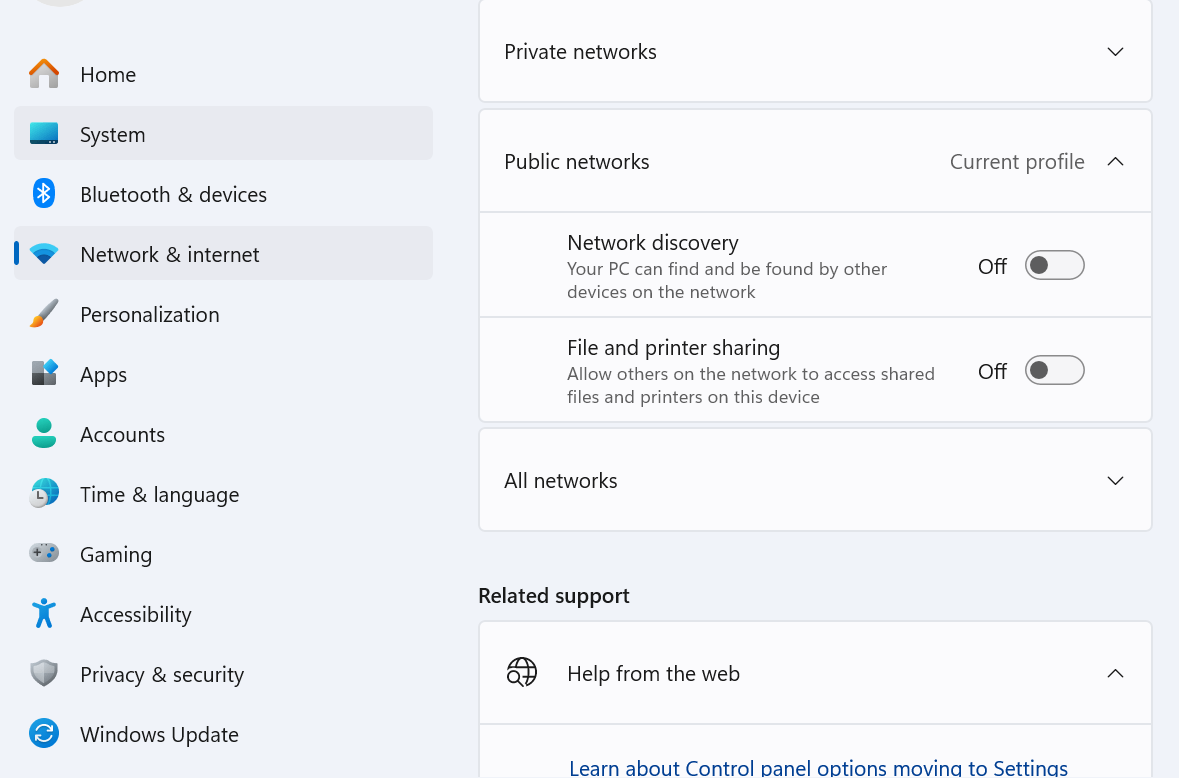
    5. Disable File and printer sharing in Settings

    By disabling this setting, I prevent hackers from accessing files on my PC. Here’s how I do it:

    Open Settings and navigate to Network and Internet > Advanced network settings > Advanced sharing settings. Now toggle File and printer sharing to off.

    On the same page, you might also want to turn off Network discovery for an extra layer of protection against hacking.
    Wi-Fi

    Dominic Bayley / Foundry

    Heres public Risks Safe WiFi
    Share. Facebook Twitter Pinterest LinkedIn Tumblr Email
    Previous ArticleTomorrow We Could See the iPhone 17 Debut With a Long-Overdue Update
    Next Article Spotify’s new Smart Filters are the decluttering tools I’ve longed for, but they’re missing one key element I can’t get past
    techupdateadmin
    • Website

    Related Posts

    Gadgets

    My Health Anxiety Means I Won’t Use Apple’s or Samsung’s Smartwatches. Here’s Why

    December 22, 2025
    Gadgets

    Android might finally stop making you tap twice for Wi-Fi

    December 22, 2025
    Gadgets

    7 Useful Tips for Anyone Connecting to Public Wi-Fi

    December 20, 2025
    Add A Comment
    Leave A Reply Cancel Reply

    Top Posts

    NYT Strands hints and answers for Monday, August 11 (game #526)

    August 11, 202545 Views

    These 2 Cities Are Pushing Back on Data Centers. Here’s What They’re Worried About

    September 13, 202542 Views

    Today’s NYT Connections: Sports Edition Hints, Answers for Sept. 4 #346

    September 4, 202540 Views
    Stay In Touch
    • Facebook
    • YouTube
    • TikTok
    • WhatsApp
    • Twitter
    • Instagram
    Latest Reviews

    Subscribe to Updates

    Get the latest tech news from FooBar about tech, design and biz.

    Most Popular

    Best Fitbit fitness trackers and watches in 2025

    July 9, 20250 Views

    There are still 200+ Prime Day 2025 deals you can get

    July 9, 20250 Views

    The best earbuds we’ve tested for 2025

    July 9, 20250 Views
    Our Picks

    My Health Anxiety Means I Won’t Use Apple’s or Samsung’s Smartwatches. Here’s Why

    December 22, 2025

    You can now buy the OnePlus 15 in the US and score free earbuds if you hurry

    December 22, 2025

    Today’s NYT Connections: Sports Edition Hints, Answers for Dec. 22 #455

    December 22, 2025

    Subscribe to Updates

    Get the latest creative news from FooBar about art, design and business.

    Facebook X (Twitter) Instagram Pinterest
    • About Us
    • Contact us
    • Privacy Policy
    • Disclaimer
    • Terms and Conditions
    © 2026 techupdatealert. Designed by Pro.

    Type above and press Enter to search. Press Esc to cancel.