



I have a confession to make: I don’t always do as I say.
I’ve been a tech journalist for 20 years. Over those years, I’ve written countless how-to guides and advice columns, and I’ve made endless recommendations for how you should go about looking after, maintaining, and enhancing your PC.
But I’m embarrassed to say, I don’t follow all of the tips and tricks I share, and I sometimes fall into the very traps I warn others against. It’s time to come clean and admit my mistakes. Here are some of my worst tech sins that you should avoid doing yourself. Don’t be like me!
I have 38,000 unread emails
Jon Martindale / Foundry
This is one of those ones that I can get away with pretty easily, mostly because I’m not about to let just anyone take a peek at my email account. But when I’ve occasionally had friends or colleagues glance at my screen while I’m working, they’ve been horrified.
“What happens if someone sends you something important?” they ask. “How do you know when you get a new email?” The tech-savvy ones even tell me, “You really should set up some filters.”
And they’re all correct. Having tens of thousands of unread emails isn’t just messy. It’s distracting. Impractical. The unread counter is completely arbitrary at this point—I don’t even think about it anymore.
Why don’t I deal with it? I suppose I just don’t need to. I get so many emails that if I’d spent all day opening or “reading” them simply so they don’t show up as “unread,” then I’d never get anything done. (I should probably just delete them all!) A quick parse to see if I got anything important, then I’m on to whatever actual task I need to do.
My drivers and BIOS aren’t up-to-date
I’ve been having some trouble with weird system locks recently. I think it has to do with a misconfigured webcam driver, but it could also be my second monitor, or a faulty HDMI cable.
To make sure it wasn’t software-related, I updated my graphics drivers—and apparently I hadn’t updated them since early 2024. Oops. I later went to update my BIOS as another potential fix for my system glitching woes—and apparently I hadn’t flashed that since late 2023.
I’ve given myself a well-deserved slap on the wrist for both of these. It’s something I should do more often, but it just keeps slipping my mind and I never find the time to get around to them. I mean, sure, it’s not something you have to do… but it’s a good idea because an outdated BIOS and/or drivers can cause issues.
I plug my phone in to transfer files
I know there are a bunch of ways to get files off my phone onto my PC. There are apps, network sharing, and cloud storage options that are all pretty straightforward. But for the most part, when I want to back up my photos or transfer documents between phone and PC, I still plug in.
I have a USB-C-to-A cable with a USB 3.0 port at best—it isn’t fast, so big data transfers can take time. It’s cable-tied to my desk, though, so it’s always within easy reach. And it does a good enough job for moving data around that I’ve never bothered to investigate a better solution.
Lazy? Perhaps. But the time and effort needed to explore better alternatives has always felt better spent elsewhere for me.
When I reinstall Windows, I just buy new storage drives
Jon Martindale / Foundry
This sin is more in the vein of a privileged humblebrag than it is a mistake or bad habit, but it’s a great example of the kind of paranoia I have when moving to a fresh, new Windows install.
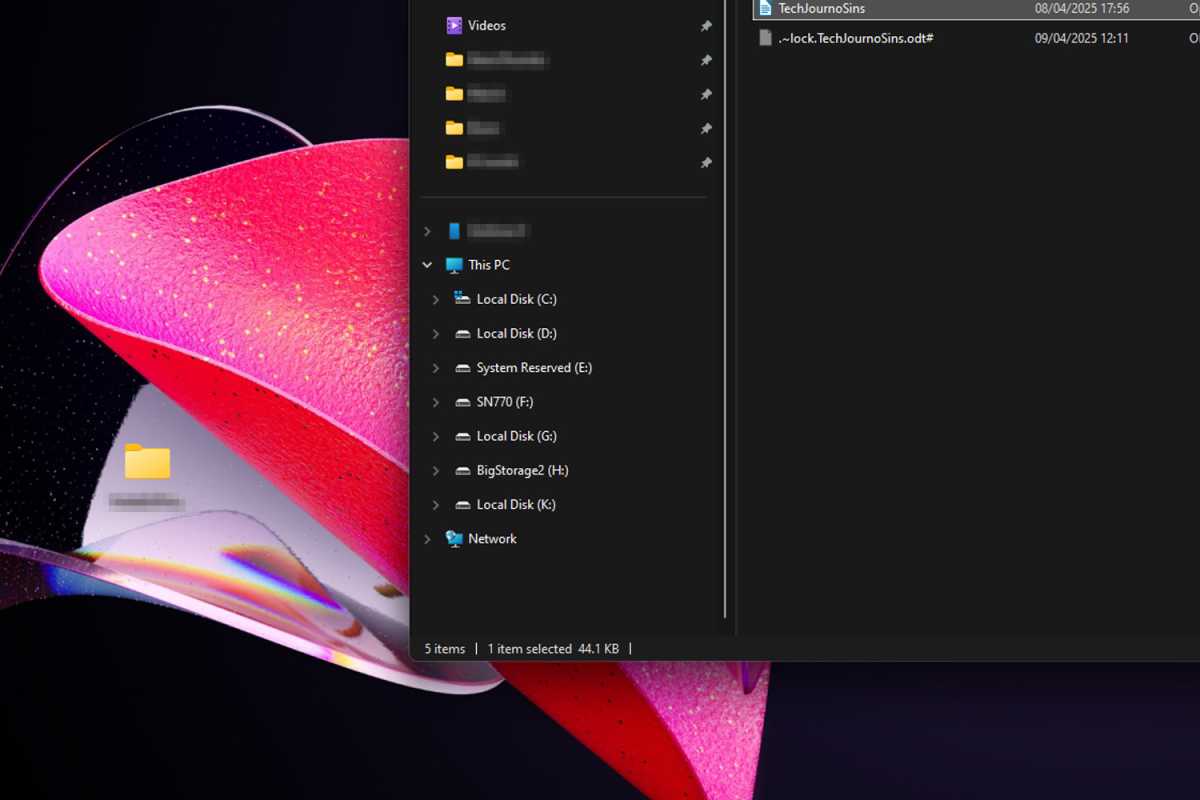
I’m so concerned that Windows will accidentally delete something I need (or that I’ll forget to back something up) that instead of reinstalling Windows on the same drive (or manually backing up important files and performing an old-school format), I just prefer to buy a new drive altogether and keep the old drive as extra storage.
The plus side of this is that I always have a fresh new drive to install new games and apps on, and I have everything else on my older drives. The downside is that my system has grown into a Frankenstein’s monster of drive letters. I still have the 500GB Samsung 850 EVO from three installs ago. It’s also left me with a lot of drives called “Local Disk” and it often takes a few tries for me to find the actual drive I’m looking for.
I use a high mouse DPI all the time
I’m well aware that many pro PC gamers play at 800 to 1,200 DPI on their gaming mice, with massive mouse pads over which they sweep their arms for pinpoint accuracy. But I’m not about that life.
I run my mice at around 2,400 DPI all the time, no matter what I’m doing, and that works well enough for me. I use a fingertip grip style, so my mouse is mostly controlled by my index and ring fingers resting on either side of the mouse, and that means I need a sensitivity level that traverses real distance with minimal movement. At 2,400 DPI, I can perform most of my required mousing in a small space.
I don’t play much in the way of high-speed FPS games—where the added accuracy from a lower DPI would be really worth it—but even when I do, I don’t switch it up. I like my mouse sensitivity and I’m not going to kid myself into thinking I can be competitive anyway. I’m just here to score objectives and try not to die more than anyone else on my team.
I only reboot my PC when it crawls
I quite often finish my work days with tasks still open, projects halfway done, and emails I haven’t gotten to yet, so I usually just minimize those windows, switch to a new desktop view, and come back to them later. And when I’m done for the day, I don’t bother saving everything or bookmarking tabs—I just put the PC to sleep.
That means I rarely shut down my computer. Which isn’t a huge deal for the most part, but when I’m several weeks in without a proper reboot, I can usually tell. Network performance drops off a cliff for some reason, videos begin to stutter, browser tabs start lagging… and that’s when I know it’s time to restart. I should do it more often, though.
I’ve let my PC pile up with issues
I spend most of my days working with and writing about PCs, hardware components, and software, so when it comes to my main work and gaming machine, I just want to use it. Don’t get me wrong: I love fiddling with computers and seeing what I can do with them. But I hate troubleshooting when I need to focus or when I want to relax.
That’s resulted in me having a PC with a surprising amount of nagging issues for someone who writes guides on how to fix said issues. For example, I have one odd boot issue where sometimes apps won’t load properly and are only half-responsive. It has something to do with my webcam I’m pretty sure, but I haven’t nailed it down yet.
I also have a second monitor that occasionally flickers with weird white bands, but unplugging and replugging it gets it going again. And for a PC running on a 7950X3D and a PCIe 4 SSD, the startup time is awfully sluggish. I really should do something about all of that… but I can’t be bothered. Don’t be like me. Don’t let your problems pile up.
I have too many desktop icons

Jon Martindale / Foundry
This is one that my less-tech-savvy friends rag on me for. It’s not as bad as my 70-year-old mother’s desktop—which is more icon than background at this point—but I’ll admit it’s a bit chaotic. I don’t have any shortcuts there, but I do have far too many folders. They’re often for past projects I haven’t gotten back to in a while, but I swear I will… one day…
Honestly, I think this is more aesthetic preference than anything, as functionally there’s little difference between having a folder where I save all my Photoshopped news thumbnails on the desktop or nestled deeper into a drive. Regardless, it doesn’t look super professional.
Do as I say, not as I do
Writing this article has been an eye opener for me. Not only did I not realize how many tech sins I was committing, but I never knew I was relying on so many stop-gap solutions. A lot of these issues could be solved by just spending a little more time doing things the right way, which I often evangelize in my how-to guides.
The truth is, we may share all kinds of advice with you—whether it’s about good digital security habits, extending your SSD’s lifespan, buying a refurbished laptop, or being more productive with Windows 11—even if we aren’t perfect about heeding those very same tips.
So, let me make this pledge to you, oh reader who holds yourself to a higher standard than this pontificating tech expert: I will do better. Perhaps I’ll write up another edition of this in a year and we can see how many of my sins I’ve absolved myself of.
