
Close Menu
TechUpdateAlert

    Subscribe to Updates

    Get the latest creative news from FooBar about art, design and business.

    What's Hot

    My Health Anxiety Means I Won’t Use Apple’s or Samsung’s Smartwatches. Here’s Why

    December 22, 2025

    You can now buy the OnePlus 15 in the US and score free earbuds if you hurry

    December 22, 2025

    Today’s NYT Connections: Sports Edition Hints, Answers for Dec. 22 #455

    December 22, 2025
    Facebook X (Twitter) Instagram
    Trending
    • My Health Anxiety Means I Won’t Use Apple’s or Samsung’s Smartwatches. Here’s Why
    • You can now buy the OnePlus 15 in the US and score free earbuds if you hurry
    • Today’s NYT Connections: Sports Edition Hints, Answers for Dec. 22 #455
    • Android might finally stop making you tap twice for Wi-Fi
    • Today’s NYT Mini Crossword Answers for Dec. 22
    • Waymo’s robotaxis didn’t know what to do when a city’s traffic lights failed
    • Today’s NYT Wordle Hints, Answer and Help for Dec. 22 #1647
    • You Asked: OLED Sunlight, VHS on 4K TVs, and HDMI Control Issues
    Facebook X (Twitter) Instagram Pinterest Vimeo
    TechUpdateAlertTechUpdateAlert
    • Home
    • Gaming
    • Laptops
    • Mobile
    • Software
    • Reviews
    • AI & Tech
    • Gadgets
    • How-To
    TechUpdateAlert
    Home»Gadgets»iOS 26 Beta: Here’s How to Adjust Your iPhone’s New Liquid Glass Design
    Gadgets

    iOS 26 Beta: Here’s How to Adjust Your iPhone’s New Liquid Glass Design

    techupdateadminBy techupdateadminAugust 31, 2025No Comments3 Mins Read
    Share Facebook Twitter Pinterest LinkedIn Tumblr Reddit Telegram Email
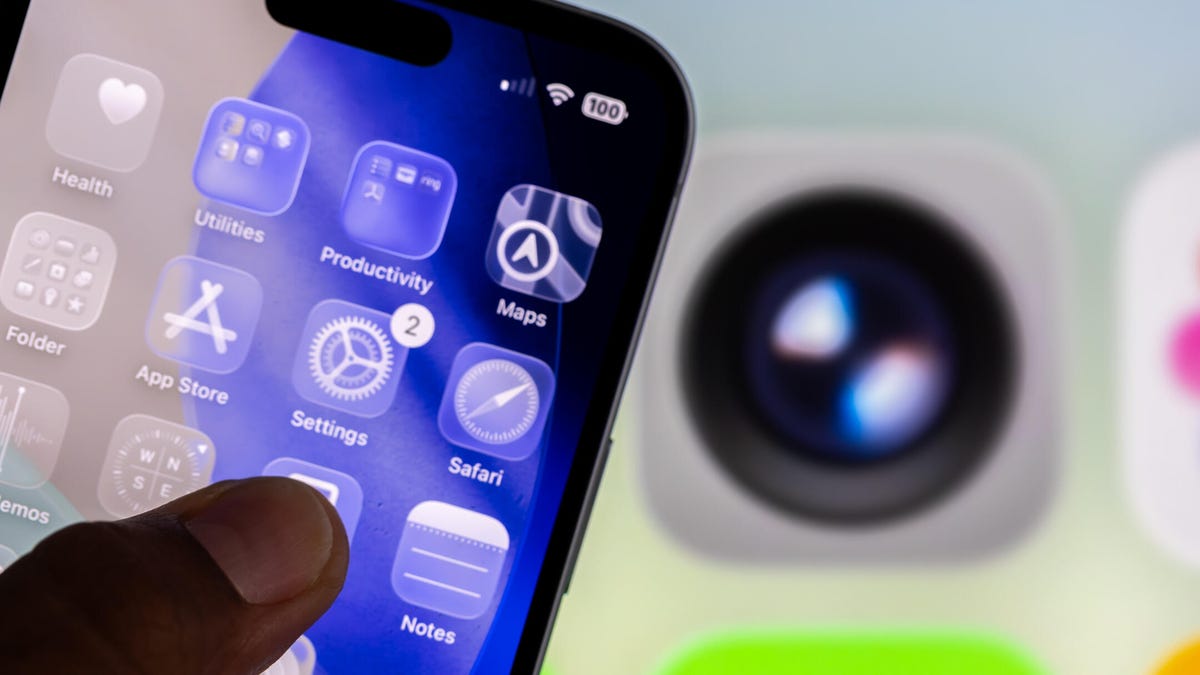
    An iPhone with clear app icons.
    Share
    Facebook Twitter LinkedIn Pinterest Email

    Apple released the fifth public beta of iOS 26 on Aug. 25, and the beta brings a new Liquid Glass design to the iPhones of developers and beta testers, alongside other updates like call screening. But if you’re not a fan of the Liquid Glass design, I found a way to reduce its effects so background images aren’t bleeding through menus and making things hard to read. 

    Tech Tips

    When Apple released the developer beta of iOS 26, people were torn about the design. Some were excited about it, while others — myself included — were concerned about readability with the new design. Apple has tweaked Liquid Glass during the iOS 26 beta process to improve legibility by adding more of a frosted look, but you still might not be happy with the new design. Thankfully, you can adjust the Liquid Glass design in just a few steps, significantly reducing its transparency.

    Here’s how to make the Liquid Glass design in iOS 26 more legible. 

    And don’t forget, iOS 26 is still in beta. That means the update might be buggy for you, and your device’s battery life may be affected, so it’s best to keep those troubles off your primary device. If you want to try the beta out, I recommend downloading it on a secondary device. 

    It’s also possible that Apple could adjust Liquid Glass, and other update features, before the final version of iOS 26 is released this fall.


    Don’t miss any of our unbiased tech content and lab-based reviews. Add CNET as a preferred Google source.


    How to adjust Liquid Glass

    1. Open Settings.
    2. Tap Accessibility.
    3. Tap Display & Text Size.
    4. Tap the toggle for Reduce Transparency. 

    This will darken any menus or spaces affected by the Liquid Glass design, including in apps like Messages and your Control Center.

    Two iPhone control center menus. On the left, the Liquid Glass design isn't dimmed, but on the right Reduce Transparency is on, reducing the affects of Liquid Glass.

    On the left, we see the Liquid Glass design in its full affect, and on the right the Reduce Transparency setting has been enabled. 

    Apple/CNET

    In the Display & Text Size menu, you can also tap the toggle next to Increase Contrast to help set Liquid Glass elements apart. When I enabled this toggle, it gave a lot of those elements a white outline.

    An iPhone's Control Center. Widgets and controls have a white outline around them.

    Increase Contrast adds outlines to elements throughout your iPhone.

    Apple/Screenshot by CNET

    If Apple continues to tweak Liquid Glass during the beta and you want to bring the design elements back to your device, follow the above steps again to disable Reduce Transparency.

    Apple is set to bring iOS 26 and Liquid Glass to all compatible devices this fall — I’m guessing in a few weeks.

    For more iOS news, here are my first impressions of the beta version of iOS 26, how to enable call screening in the beta and all the new features Apple said it will bring to your device later this year. You can get an early view of the upcoming iPhone features with our iOS 26 cheat sheet.

    Watch this: Apple’s iPhone 17 Invite Has a Nifty Interactive Easter Egg

    00:25

    adjust beta Design Glass Heres iOS iPhones Liquid
    Share. Facebook Twitter Pinterest LinkedIn Tumblr Email
    Previous ArticleDyson V8 vs V15 Detect cordless vacuum: what’s the difference and which should I buy?
    Next Article 7 new horror movies on Prime Video, Shudder, HBO Max, and more in September 2025
    techupdateadmin
    • Website

    Related Posts

    Gadgets

    My Health Anxiety Means I Won’t Use Apple’s or Samsung’s Smartwatches. Here’s Why

    December 22, 2025
    Gadgets

    You can now buy the OnePlus 15 in the US and score free earbuds if you hurry

    December 22, 2025
    Gadgets

    Today’s NYT Connections: Sports Edition Hints, Answers for Dec. 22 #455

    December 22, 2025
    Add A Comment
    Leave A Reply Cancel Reply

    Top Posts

    NYT Strands hints and answers for Monday, August 11 (game #526)

    August 11, 202545 Views

    These 2 Cities Are Pushing Back on Data Centers. Here’s What They’re Worried About

    September 13, 202542 Views

    Today’s NYT Connections: Sports Edition Hints, Answers for Sept. 4 #346

    September 4, 202540 Views
    Stay In Touch
    • Facebook
    • YouTube
    • TikTok
    • WhatsApp
    • Twitter
    • Instagram
    Latest Reviews

    Subscribe to Updates

    Get the latest tech news from FooBar about tech, design and biz.

    Most Popular

    Best Fitbit fitness trackers and watches in 2025

    July 9, 20250 Views

    There are still 200+ Prime Day 2025 deals you can get

    July 9, 20250 Views

    The best earbuds we’ve tested for 2025

    July 9, 20250 Views
    Our Picks

    My Health Anxiety Means I Won’t Use Apple’s or Samsung’s Smartwatches. Here’s Why

    December 22, 2025

    You can now buy the OnePlus 15 in the US and score free earbuds if you hurry

    December 22, 2025

    Today’s NYT Connections: Sports Edition Hints, Answers for Dec. 22 #455

    December 22, 2025

    Subscribe to Updates

    Get the latest creative news from FooBar about art, design and business.

    Facebook X (Twitter) Instagram Pinterest
    • About Us
    • Contact us
    • Privacy Policy
    • Disclaimer
    • Terms and Conditions
    © 2026 techupdatealert. Designed by Pro.

    Type above and press Enter to search. Press Esc to cancel.