
Close Menu
TechUpdateAlert

    Subscribe to Updates

    Get the latest creative news from FooBar about art, design and business.

    What's Hot

    My Health Anxiety Means I Won’t Use Apple’s or Samsung’s Smartwatches. Here’s Why

    December 22, 2025

    You can now buy the OnePlus 15 in the US and score free earbuds if you hurry

    December 22, 2025

    Today’s NYT Connections: Sports Edition Hints, Answers for Dec. 22 #455

    December 22, 2025
    Facebook X (Twitter) Instagram
    Trending
    • My Health Anxiety Means I Won’t Use Apple’s or Samsung’s Smartwatches. Here’s Why
    • You can now buy the OnePlus 15 in the US and score free earbuds if you hurry
    • Today’s NYT Connections: Sports Edition Hints, Answers for Dec. 22 #455
    • Android might finally stop making you tap twice for Wi-Fi
    • Today’s NYT Mini Crossword Answers for Dec. 22
    • Waymo’s robotaxis didn’t know what to do when a city’s traffic lights failed
    • Today’s NYT Wordle Hints, Answer and Help for Dec. 22 #1647
    • You Asked: OLED Sunlight, VHS on 4K TVs, and HDMI Control Issues
    Facebook X (Twitter) Instagram Pinterest Vimeo
    TechUpdateAlertTechUpdateAlert
    • Home
    • Gaming
    • Laptops
    • Mobile
    • Software
    • Reviews
    • AI & Tech
    • Gadgets
    • How-To
    TechUpdateAlert
    Home»Laptops»Microsoft is retiring the Mobile Plans app
    Laptops

    Microsoft is retiring the Mobile Plans app

    techupdateadminBy techupdateadminAugust 31, 2025No Comments4 Mins Read
    Share Facebook Twitter Pinterest LinkedIn Tumblr Reddit Telegram Email
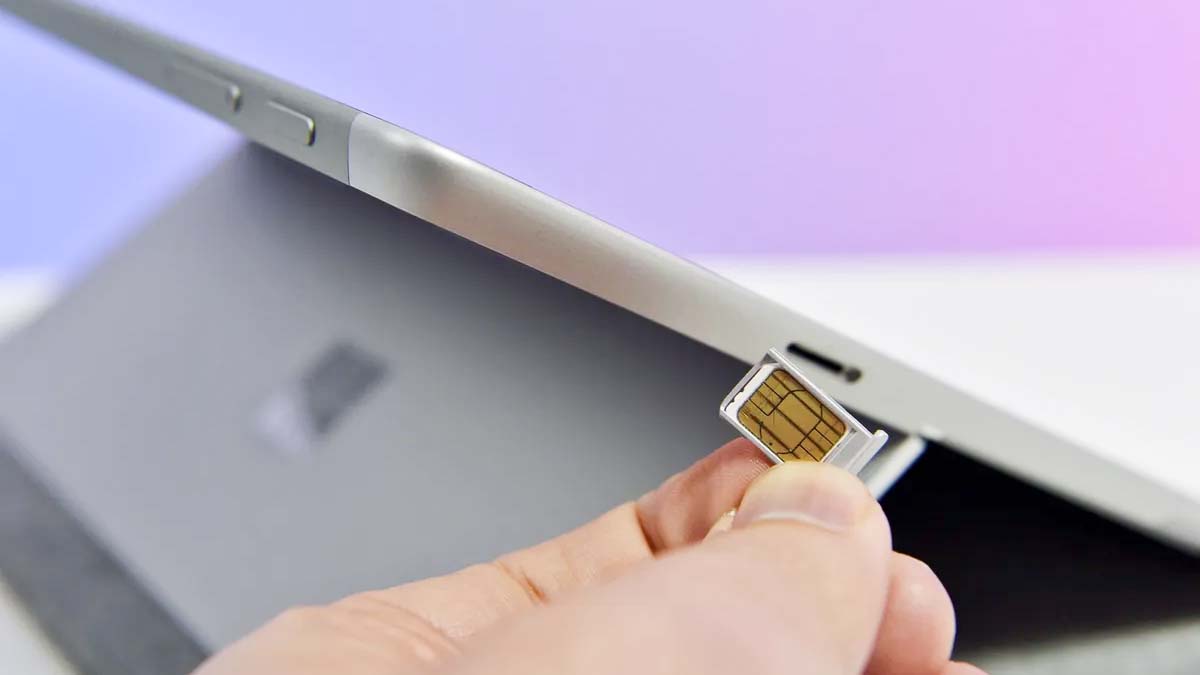
    Surface Go LTE with SIM card.
    Share
    Facebook Twitter LinkedIn Pinterest Email

    Microsoft is about to kill off another “mobile” app, but you probably won’t miss this one. The Mobile Plans app is set to retire, and Microsoft recommends using a browser instead.

    The Mobile Plans app can be used to purchase and manage cellular plans, at least at the moment. Microsoft will retire the app on February 27, 2026.

    Normally, I’d mourn the end of an app, but the Mobile Plans app is not anything special. Its core functionality is easily replaced by websites. Even though it was updated in June, the app’s Microsoft Store listing still references Windows 10 instead of Windows 11.


    You may like

    The end of the Mobile Plans app will not hurt the best 5G Windows laptops. Those devices will simply require a user to buy or manage cellular plans through the website of a provider.

    If you’ve set up an eSIM data plan through the Mobile Plans app, it will continue to work. But you’ll need to use a browser to manage existing data plans or eSIM profiles.

    You can already activate eSIM on Windows 11 through a website, by using a QR code, or by entering details manually. Soon, the operating system will have a new feature to make the process easier.

    A feature that’s currently in testing among Windows Insiders prompts you to use the Settings app to share cellular identifiers with an operator’s website. If you approve the prompt, those details will be passed to the carrier without you needing to type anything.

    All the latest news, reviews, and guides for Windows and Xbox diehards.

    Microsoft explains that the feature will become generally available later this year and that mobile operators will add support throughout 2026.

    Is 5G worth it on a laptop?

    The Surface Pro 11 is available with 5G, making it simple to keep the PC connected to the web while on the move. (Image credit: Daniel Rubino)

    Staying connected to the web is essential for many workflows in 2025. While it is possible to tether a laptop to a smartphone or hotspot, using a PC with built-in 5G or 4G LTE support will provide a more seamless experience.

    Assuming you are using one of the best data plans for Windows laptops, connecting to 5G or 4G LTE will ensure your PC is connected to the web.

    READ MORE: How to set up eSIM on a laptop 🛜

    Many of the best Windows laptops have 5G or 4G LTE options, including Microsoft’s Surface Pro 11. Lenovo, HP, Panasonic, and Dell round out our list of the best laptops with 5G and 4G LTE connectivity.

    Microsoft also reengineered the Surface Laptop 7 with 5G in mind, though the device is rather expensive. It’s worth noting that much of the PC’s high price comes from it being a business device with an Intel Core Ultra series 2 processor.

    What is an eSIM?

    Surface Go LTE with SIM card.

    Unlike a physical SIM card (shown above), an eSIM is digital and reduces some of the hassle of dealing with a removable component. (Image credit: Daniel Rubino / Windows Central)

    There’s a good chance that you’ve used a device with a physical SIM card. Many phones, tablets, and laptops have slots for a full-size SIM card or a Nano SIM card. Those cards allow you to connect your device to a network.

    An eSIM provides similar functionality without requiring you to pop in a physical card. eSIM is short for “embedded SIM,” meaning the SIM card is built directly into a device.

    eSIMs are especially popular among those who travel, since they let you quickly switch to a carrier in another country while traveling. They are also a convenient way to keep your laptop connected to the web.

    Depending on the device you have and the carrier you sign up with, your PC will be able to connect through 5G or 4G LTE. In many cases, a 4G LTE connection will cover the needs of people using a laptop on the go. A solid 5G connection will provide faster speeds and lower latency than 4G LTE, so it’s a nice option to have.

    app Microsoft mobile Plans retiring
    Share. Facebook Twitter Pinterest LinkedIn Tumblr Email
    Previous ArticleToday’s NYT Connections: Sports Edition Hints, Answers for Aug. 31 #342
    Next Article 7 creative ways to personalize your phone’s wallpaper
    techupdateadmin
    • Website

    Related Posts

    Mobile

    Who owns Trump Mobile? | The Verge

    December 20, 2025
    Gadgets

    LG forced a Copilot web app onto its TVs but will let you delete it

    December 19, 2025
    Mobile

    Samsung announces Exynos 2600, the world’s first 2nm mobile chip

    December 19, 2025
    Add A Comment
    Leave A Reply Cancel Reply

    Top Posts

    NYT Strands hints and answers for Monday, August 11 (game #526)

    August 11, 202545 Views

    These 2 Cities Are Pushing Back on Data Centers. Here’s What They’re Worried About

    September 13, 202542 Views

    Today’s NYT Connections: Sports Edition Hints, Answers for Sept. 4 #346

    September 4, 202540 Views
    Stay In Touch
    • Facebook
    • YouTube
    • TikTok
    • WhatsApp
    • Twitter
    • Instagram
    Latest Reviews

    Subscribe to Updates

    Get the latest tech news from FooBar about tech, design and biz.

    Most Popular

    Best Fitbit fitness trackers and watches in 2025

    July 9, 20250 Views

    There are still 200+ Prime Day 2025 deals you can get

    July 9, 20250 Views

    The best earbuds we’ve tested for 2025

    July 9, 20250 Views
    Our Picks

    My Health Anxiety Means I Won’t Use Apple’s or Samsung’s Smartwatches. Here’s Why

    December 22, 2025

    You can now buy the OnePlus 15 in the US and score free earbuds if you hurry

    December 22, 2025

    Today’s NYT Connections: Sports Edition Hints, Answers for Dec. 22 #455

    December 22, 2025

    Subscribe to Updates

    Get the latest creative news from FooBar about art, design and business.

    Facebook X (Twitter) Instagram Pinterest
    • About Us
    • Contact us
    • Privacy Policy
    • Disclaimer
    • Terms and Conditions
    © 2026 techupdatealert. Designed by Pro.

    Type above and press Enter to search. Press Esc to cancel.