

Close Menu
TechUpdateAlert

    Subscribe to Updates

    Get the latest creative news from FooBar about art, design and business.

    What's Hot

    My Health Anxiety Means I Won’t Use Apple’s or Samsung’s Smartwatches. Here’s Why

    December 22, 2025

    You can now buy the OnePlus 15 in the US and score free earbuds if you hurry

    December 22, 2025

    Today’s NYT Connections: Sports Edition Hints, Answers for Dec. 22 #455

    December 22, 2025
    Facebook X (Twitter) Instagram
    Trending
    • My Health Anxiety Means I Won’t Use Apple’s or Samsung’s Smartwatches. Here’s Why
    • You can now buy the OnePlus 15 in the US and score free earbuds if you hurry
    • Today’s NYT Connections: Sports Edition Hints, Answers for Dec. 22 #455
    • Android might finally stop making you tap twice for Wi-Fi
    • Today’s NYT Mini Crossword Answers for Dec. 22
    • Waymo’s robotaxis didn’t know what to do when a city’s traffic lights failed
    • Today’s NYT Wordle Hints, Answer and Help for Dec. 22 #1647
    • You Asked: OLED Sunlight, VHS on 4K TVs, and HDMI Control Issues
    Facebook X (Twitter) Instagram Pinterest Vimeo
    TechUpdateAlertTechUpdateAlert
    • Home
    • Gaming
    • Laptops
    • Mobile
    • Software
    • Reviews
    • AI & Tech
    • Gadgets
    • How-To
    TechUpdateAlert
    Home»Reviews»Here’s how I stop spam emails from ever reaching my inbox
    Reviews

    Here’s how I stop spam emails from ever reaching my inbox

    techupdateadminBy techupdateadminAugust 8, 2025No Comments2 Mins Read
    Share Facebook Twitter Pinterest LinkedIn Tumblr Reddit Telegram Email
    laptop
    Share
    Facebook Twitter LinkedIn Pinterest Email

    Despite the best efforts of the spam blockers in my email inboxes, I still get dozens of spam emails every day that I then have to wade through to get to my real emails. The irony is, the more I use my email addresses in online forms, the more spam I get.

    But I’ve discovered a way to stop the spam ever reaching my inboxes. I now use DuckDuckGo’s Email Protection feature to disguise my real email addresses so that spam emails are sent to the DuckDuckGo designated address instead of my own, but real emails make it through to my real address.

    In case you haven’t heard of it, DuckDuckGo is a search engine and browser that boasts a suite of privacy and security features.

    Specifically, it blocks third-party trackers and also blocks targeted ads. It also allows users to delete their data with just one click.

    Dominic Bayley / Foundry

    All you have to do to disguise your email address is set up a free “@duck.com” email address in DuckDuckGo and use it as your email address, then designate a forwarding address (your real email). Here’s how to do that.

    What to do:

    • Download and install the DuckDuckGo browser and make it your default browser. Follow the prompts to set it up.
    • Download and install the DuckDuckGo’s Search and Tracker Protection extension.
    • Open your DuckDuckGo browser. On the home screen click the three bars to the right of the search bar and navigate to Email Protection. Click “Get Started” then “Next” and agree to the terms and conditions.
    • Now follow the prompts to choose a personalized Duck address and then in the field below enter the email address that you’d like emails to your Duck address forwarded to.
    • Now that you have a Duck email address, use this instead of the “real address” to prevent spam reaching your inbox. You can also reply to emails directly from your Duck address if you wish.
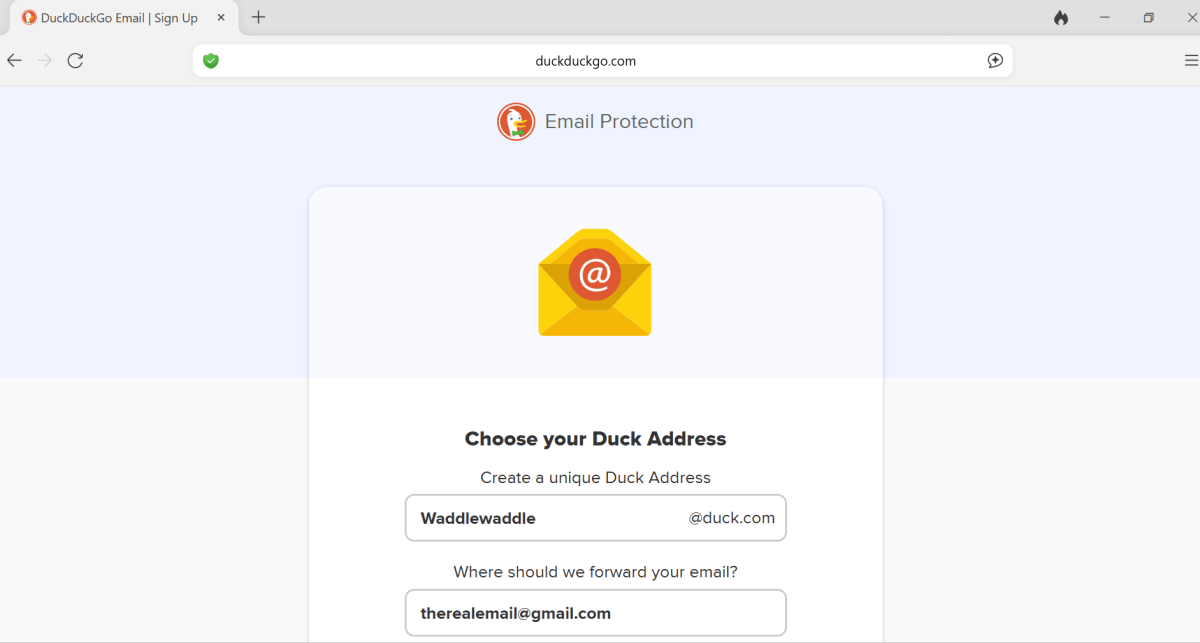
    DuckDuckGo

    You can select an alias Duck address to disguise another address.

    Dominic Bayley / Foundry

    That’s a wrap for this tip. Be sure to sign up to our PCWorld Try This newsletter if you haven’t already for more tips like this delivered to your inbox twice weekly!

    emails Heres Inbox reaching spam stop
    Share. Facebook Twitter Pinterest LinkedIn Tumblr Email
    Previous ArticleBreath Work, Biohacking, and Cryotherapy: New Buzzwords for Modern Business Travelers
    Next Article Ready or Not Regains Flagship Xbox Feature, Play Anywhere
    techupdateadmin
    • Website

    Related Posts

    Gadgets

    My Health Anxiety Means I Won’t Use Apple’s or Samsung’s Smartwatches. Here’s Why

    December 22, 2025
    Gadgets

    Android might finally stop making you tap twice for Wi-Fi

    December 22, 2025
    Mobile

    Oppo Pad Air5’s launch date is official, here’s what it looks like

    December 20, 2025
    Add A Comment
    Leave A Reply Cancel Reply

    Top Posts

    NYT Strands hints and answers for Monday, August 11 (game #526)

    August 11, 202545 Views

    These 2 Cities Are Pushing Back on Data Centers. Here’s What They’re Worried About

    September 13, 202542 Views

    Today’s NYT Connections: Sports Edition Hints, Answers for Sept. 4 #346

    September 4, 202540 Views
    Stay In Touch
    • Facebook
    • YouTube
    • TikTok
    • WhatsApp
    • Twitter
    • Instagram
    Latest Reviews

    Subscribe to Updates

    Get the latest tech news from FooBar about tech, design and biz.

    Most Popular

    Best Fitbit fitness trackers and watches in 2025

    July 9, 20250 Views

    There are still 200+ Prime Day 2025 deals you can get

    July 9, 20250 Views

    The best earbuds we’ve tested for 2025

    July 9, 20250 Views
    Our Picks

    My Health Anxiety Means I Won’t Use Apple’s or Samsung’s Smartwatches. Here’s Why

    December 22, 2025

    You can now buy the OnePlus 15 in the US and score free earbuds if you hurry

    December 22, 2025

    Today’s NYT Connections: Sports Edition Hints, Answers for Dec. 22 #455

    December 22, 2025

    Subscribe to Updates

    Get the latest creative news from FooBar about art, design and business.

    Facebook X (Twitter) Instagram Pinterest
    • About Us
    • Contact us
    • Privacy Policy
    • Disclaimer
    • Terms and Conditions
    © 2026 techupdatealert. Designed by Pro.

    Type above and press Enter to search. Press Esc to cancel.