
Close Menu
TechUpdateAlert

    Subscribe to Updates

    Get the latest creative news from FooBar about art, design and business.

    What's Hot

    My Health Anxiety Means I Won’t Use Apple’s or Samsung’s Smartwatches. Here’s Why

    December 22, 2025

    You can now buy the OnePlus 15 in the US and score free earbuds if you hurry

    December 22, 2025

    Today’s NYT Connections: Sports Edition Hints, Answers for Dec. 22 #455

    December 22, 2025
    Facebook X (Twitter) Instagram
    Trending
    • My Health Anxiety Means I Won’t Use Apple’s or Samsung’s Smartwatches. Here’s Why
    • You can now buy the OnePlus 15 in the US and score free earbuds if you hurry
    • Today’s NYT Connections: Sports Edition Hints, Answers for Dec. 22 #455
    • Android might finally stop making you tap twice for Wi-Fi
    • Today’s NYT Mini Crossword Answers for Dec. 22
    • Waymo’s robotaxis didn’t know what to do when a city’s traffic lights failed
    • Today’s NYT Wordle Hints, Answer and Help for Dec. 22 #1647
    • You Asked: OLED Sunlight, VHS on 4K TVs, and HDMI Control Issues
    Facebook X (Twitter) Instagram Pinterest Vimeo
    TechUpdateAlertTechUpdateAlert
    • Home
    • Gaming
    • Laptops
    • Mobile
    • Software
    • Reviews
    • AI & Tech
    • Gadgets
    • How-To
    TechUpdateAlert
    Home»AI & Tech»This Multidevice Keyboard Tamed My Cluttered Workspace and Now I’m Never Going Back
    AI & Tech

    This Multidevice Keyboard Tamed My Cluttered Workspace and Now I’m Never Going Back

    techupdateadminBy techupdateadminAugust 7, 2025No Comments3 Mins Read
    Share Facebook Twitter Pinterest LinkedIn Tumblr Reddit Telegram Email
    This Multidevice Keyboard Tamed My Cluttered Workspace and Now I'm Never Going Back
    Share
    Facebook Twitter LinkedIn Pinterest Email

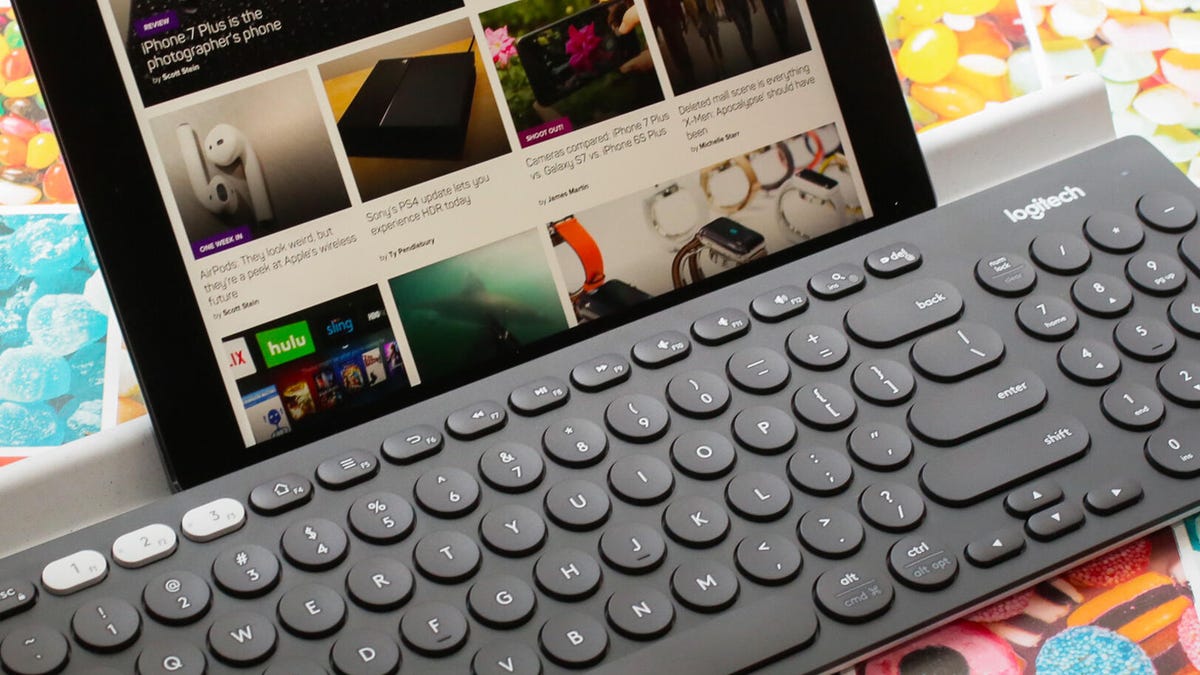
    Looking around my office, I see I have a habit of collecting computers. At least four are within reach of me right now, one is an old Chromebook I should probably throw away … er, I mean, recycle. Maybe it’s a habit I’ve carried over from my teenage years building gaming desktops for fun. In any case, I have more computers on (or under) my desk than I have hands, and nothing’s worse than cluttering up your workspace with keyboards. My solution is the Logitech K780 multidevice keyboard.

    This keyboard can switch among three devices with the press of a button. For me, that means I can seamlessly move from my work laptop and a personal computer, or even type more comfortably on my iPhone.

    If you have a variety of computers or devices around and need to switch among them, a multidevice keyboard or mouse (I use the Logitech M585) might be a more cost-effective or simpler solution than a KVM switch. Here’s how I use them.

    Hey, did you know? CNET Deals texts are free, easy and save you money.

    One keyboard for several devices

    My desk is chaotic enough as it is, balancing several beverages, notebooks, planners and the occasional (OK, frequent) incursion by a cat. Having one keyboard and mouse with dedicated, handy space is key to keeping things from getting too out of hand.

    The Logitech K780 can handle three devices. It mostly pivots between my work laptop and my personal MacBook Air but the third option can connect via Bluetooth or Logitech’s Flow system.

    Just as important, this keyboard is sturdy. I’ve been called a loud typer and this thing holds up to the punishment I give it every day. It’s a full keyboard with a number pad, which I use more than I’d expect. (You can get the K380s, without the number pad, for $38.) It connects easily with Bluetooth to Mac and Windows computers. Logitech doesn’t stress Linux compatibility — it can be hit or miss on Bluetooth — but it connects via a wireless USB dongle to a desktop running Linux Mint.

    As for the mouse, the Logitech M585 multidevice mouse I use can switch between two different computers or devices. All it takes is the toggling of a button behind the scroll wheel.

    A black Logitech keyboard on a wooden desk.

    The Logitech K780 multidevice keyboard, when not serving as a cat bed, allows me to work on more than one computer at once.

    Jon Reed/CNET

    This keyboard may be the only one you need

    With many of us working from home these days, the need to juggle multiple devices is a lot more pressing than it used to be. A multidevice Bluetooth keyboard is one way to solve that problem for the multiple-computer users in your life. It can work not only across multiple laptops or desktops but will generally work with tablets and phones too, meaning you don’t have to tap away at that touchscreen as much.

    It’s a keyboard but it’s a good one — and it may be the only one you need.

    Impulse Buys Under $25 on Amazon That Make Surprisingly Great Gifts

    See all photos

    Cluttered keyboard Multidevice Tamed Workspace
    Share. Facebook Twitter Pinterest LinkedIn Tumblr Email
    Previous ArticleNorton Antivirus Plus review: Fantastic security for digital minimalists
    Next Article I tested Tixati, a free torrent client that offers a lot to torrent users
    techupdateadmin
    • Website

    Related Posts

    Gadgets

    The best thing I bought this year: a portable mechanical keyboard

    December 13, 2025
    AI & Tech

    Don’t Overpay for a Travel Bag. My $20 Backpack Does the Job for Way Less

    November 26, 2025
    AI & Tech

    This Fitbit Sense 2 Black Friday deal saves you up to 30% on one of our favorite beginner fitness trackers

    November 26, 2025
    Add A Comment
    Leave A Reply Cancel Reply

    Top Posts

    NYT Strands hints and answers for Monday, August 11 (game #526)

    August 11, 202545 Views

    These 2 Cities Are Pushing Back on Data Centers. Here’s What They’re Worried About

    September 13, 202542 Views

    Today’s NYT Connections: Sports Edition Hints, Answers for Sept. 4 #346

    September 4, 202540 Views
    Stay In Touch
    • Facebook
    • YouTube
    • TikTok
    • WhatsApp
    • Twitter
    • Instagram
    Latest Reviews

    Subscribe to Updates

    Get the latest tech news from FooBar about tech, design and biz.

    Most Popular

    Best Fitbit fitness trackers and watches in 2025

    July 9, 20250 Views

    There are still 200+ Prime Day 2025 deals you can get

    July 9, 20250 Views

    The best earbuds we’ve tested for 2025

    July 9, 20250 Views
    Our Picks

    My Health Anxiety Means I Won’t Use Apple’s or Samsung’s Smartwatches. Here’s Why

    December 22, 2025

    You can now buy the OnePlus 15 in the US and score free earbuds if you hurry

    December 22, 2025

    Today’s NYT Connections: Sports Edition Hints, Answers for Dec. 22 #455

    December 22, 2025

    Subscribe to Updates

    Get the latest creative news from FooBar about art, design and business.

    Facebook X (Twitter) Instagram Pinterest
    • About Us
    • Contact us
    • Privacy Policy
    • Disclaimer
    • Terms and Conditions
    © 2026 techupdatealert. Designed by Pro.

    Type above and press Enter to search. Press Esc to cancel.