
Close Menu
TechUpdateAlert

    Subscribe to Updates

    Get the latest creative news from FooBar about art, design and business.

    What's Hot

    My Health Anxiety Means I Won’t Use Apple’s or Samsung’s Smartwatches. Here’s Why

    December 22, 2025

    You can now buy the OnePlus 15 in the US and score free earbuds if you hurry

    December 22, 2025

    Today’s NYT Connections: Sports Edition Hints, Answers for Dec. 22 #455

    December 22, 2025
    Facebook X (Twitter) Instagram
    Trending
    • My Health Anxiety Means I Won’t Use Apple’s or Samsung’s Smartwatches. Here’s Why
    • You can now buy the OnePlus 15 in the US and score free earbuds if you hurry
    • Today’s NYT Connections: Sports Edition Hints, Answers for Dec. 22 #455
    • Android might finally stop making you tap twice for Wi-Fi
    • Today’s NYT Mini Crossword Answers for Dec. 22
    • Waymo’s robotaxis didn’t know what to do when a city’s traffic lights failed
    • Today’s NYT Wordle Hints, Answer and Help for Dec. 22 #1647
    • You Asked: OLED Sunlight, VHS on 4K TVs, and HDMI Control Issues
    Facebook X (Twitter) Instagram Pinterest Vimeo
    TechUpdateAlertTechUpdateAlert
    • Home
    • Gaming
    • Laptops
    • Mobile
    • Software
    • Reviews
    • AI & Tech
    • Gadgets
    • How-To
    TechUpdateAlert
    Home»Laptops»Windows 11 officially kills the Blue Screen of Death in latest update
    Laptops

    Windows 11 officially kills the Blue Screen of Death in latest update

    techupdateadminBy techupdateadminJuly 24, 2025No Comments3 Mins Read
    Share Facebook Twitter Pinterest LinkedIn Tumblr Reddit Telegram Email
    Windows Black Screen of Death
    Share
    Facebook Twitter LinkedIn Pinterest Email

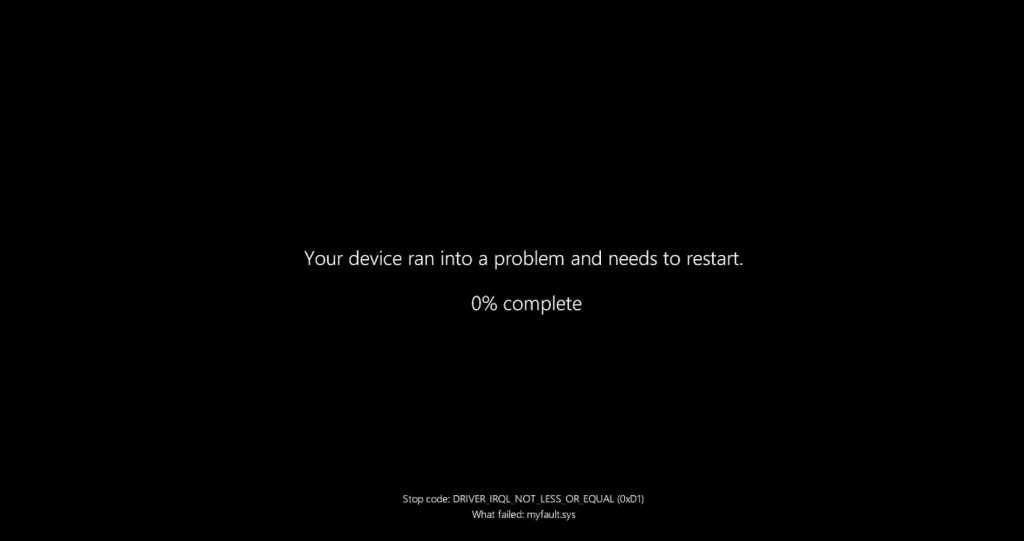
    Microsoft has released update KB5062660 for Windows 11 24H2, and that means the iconic “Blue Screen of Death” has officially been replaced by the long-awaited “Black Screen of Death” (which coincidentally shared the same BSOD acronym).

    We previously reported on this when Microsoft began testing the new black screen in a preview version of Windows. With this optional cumulative update, the change is now available to all Windows users.

    How to get update KB5062660

    Update KB5062660 is an optional update for Windows 11 24H2, which means the OS won’t automatically download it even if it’s available. You have to install it manually using Windows Update.

    Alternatively, you can also download and install update KB5062660 directly from the Microsoft Update Catalog. The full name of the update is 2025-07 Cumulative Update Preview for Windows 11 Version 24H2, and it’s available for both x64 and arm64 systems.

    After installing update KB5062660, Windows 11 will be brought up to Build 26100.4770 and will gain a preview of all the new features Microsoft plans to release on Patch Tuesday in August 2025. That future update will be auto-installed on all compatible computers.

    The new Black Screen of Death

    The most obvious new feature of update KB5062660, which you hopefully won’t see any time soon, is the Black Screen of Death that replaces the former Blue Screen of Death. The only difference between the two BSODs is visual, as nothing changes from a technical standpoint.

    Not only does the new BSOD have a black background, but it also no longer shows the sad emoticon or the QR code in addition to explanatory text. Instead, the new BSOD only informs you that a problem has occurred and that Windows needs to be restarted.

    The problem with the new BSOD is that it’s usually only displayed for about two seconds before it disappears, so a Windows user who isn’t expecting a BSOD might not even recognize that Windows has run into a problem before it restarts, especially if you’re preoccupied with something else (e.g., on your phone or talking with someone).

    Other new features in the update

    According to Windows Latest, update KB5062660 will bring many improvements for so-called AI PCs, and many of these new features will be exclusive to Copilot+ PCs.

    In addition, the controversial Recall feature is to be introduced to EU users, though you’ll be able to block access to Recall for certain applications and websites. Recall will only work locally on your PC, and you’ll be able to disable Recall completely in Windows settings.

    Another improvement brings faster recovery for Windows computers that run into widespread issues. The new Quick Machine Recovery feature automatically detects and fixes widespread issues via Windows Recovery Environment (WinRE), attempting to restore the PC by downloading a patch from Windows Update. This new feature is designed to help repair computers that can no longer boot up.

    Further reading: Microsoft explains how the new wireless PC-to-PC migration feature works

    This article originally appeared on our sister publication PC-WELT and was translated and localized from German.

    Blue Death kills Latest Officially Screen Update Windows
    Share. Facebook Twitter Pinterest LinkedIn Tumblr Email
    Previous ArticleEntire Pixel 10 series’ design revealed through the Google Play Store
    Next Article My favourite budget phone of 2025 is now cheaper still, thanks to this 29% Amazon discount
    techupdateadmin
    • Website

    Related Posts

    Gadgets

    Your next Legion Go 2 might run SteamOS instead of Windows 11

    December 21, 2025
    Gadgets

    Sony’s XM5 headphones and the latest Kindle round out this week’s best deals

    December 21, 2025
    Gadgets

    Snap rear camera selfies using this iPhone’s case’s second screen.

    December 17, 2025
    Add A Comment
    Leave A Reply Cancel Reply

    Top Posts

    NYT Strands hints and answers for Monday, August 11 (game #526)

    August 11, 202545 Views

    These 2 Cities Are Pushing Back on Data Centers. Here’s What They’re Worried About

    September 13, 202542 Views

    Today’s NYT Connections: Sports Edition Hints, Answers for Sept. 4 #346

    September 4, 202540 Views
    Stay In Touch
    • Facebook
    • YouTube
    • TikTok
    • WhatsApp
    • Twitter
    • Instagram
    Latest Reviews

    Subscribe to Updates

    Get the latest tech news from FooBar about tech, design and biz.

    Most Popular

    Best Fitbit fitness trackers and watches in 2025

    July 9, 20250 Views

    There are still 200+ Prime Day 2025 deals you can get

    July 9, 20250 Views

    The best earbuds we’ve tested for 2025

    July 9, 20250 Views
    Our Picks

    My Health Anxiety Means I Won’t Use Apple’s or Samsung’s Smartwatches. Here’s Why

    December 22, 2025

    You can now buy the OnePlus 15 in the US and score free earbuds if you hurry

    December 22, 2025

    Today’s NYT Connections: Sports Edition Hints, Answers for Dec. 22 #455

    December 22, 2025

    Subscribe to Updates

    Get the latest creative news from FooBar about art, design and business.

    Facebook X (Twitter) Instagram Pinterest
    • About Us
    • Contact us
    • Privacy Policy
    • Disclaimer
    • Terms and Conditions
    © 2026 techupdatealert. Designed by Pro.

    Type above and press Enter to search. Press Esc to cancel.