


It’s easy to get nostalgic when things change. When a new version of Windows comes out, for example, many people declare how much better its predecessor was, and now that Windows 10 is going the way of the dodo, a wave of nostalgia is washing over the tech world.
The question is: Is Windows 10 really better than 11? I myself switched to Windows 11 when it launched back in 2021. So to find out the difference, I pulled out my old Windows 10 computer and ran it for a week.
The test made me realize how much better Windows has actually become—and going back to Windows 10 was unexpectedly painful. Here are my key lessons learned.
Also read: Windows 10 is coming to an end – here are your options
Things you’ll love
Windows Explorer
Microsoft
The tool we use to manage files and folders on the computer is much better in Windows 11. In particular, I appreciate that Explorer now has tabs, just like in the browser. The overview is clearer and it’s easier to copy and move files. Going back to the old Explorer is driving me crazy.
The settings menu in Windows 11 is also much faster and smoother than in 10. It’s both easier to find and navigate.
Windows screen recorder
As a journalist, I often take screenshots, and the Screen Capture tool is much better in Windows 11. In particular, it’s handy to be able to film what’s on the screen. Doing the same thing in Windows 10 is much more complicated.
OCR
Sometimes the text displayed on the screen cannot be selected and copied. In Windows 11 this is not a problem, just open the Snipping Tool and press Text Actions and the text becomes editable—without any complicated extra programs. OCR (Optical Character Recognition), the feature that automatically converts images to text, is built into Windows 11 in much better way than Windows 10.
The apps
Windows 11 includes powerful free tools like Clipchamp (video), Copilot (AI) and Photos (pictures). While you can currently install them on your own on Windows 10, as the apps continue to evolve for Windows 11, we’ll see more differences between versions.
The speed
You can’t blame Windows 10 for my old computer feeling very slow, but if Microsoft’s own figures are to be believed, Windows 11 is up to 2.3 times faster than 10.
Windows Security
I didn’t notice the biggest advantage of Windows 11 during my test, but it’s still an important reason to switch. The system is much more secure and better protects both your private information and the computer system.
Things you’ll hate
Of course, there are things that have become worse too. This also became clear during my test. Fortunately, PCWorld has guides available that fix our worst Windows 11 gripes.
Surveillance
The big downside is that Microsoft is getting more and more aggressive about surveillance and personalized advertising—right in Windows. It has also become increasingly difficult to run Windows without logging in with your Microsoft account.
Further reading: Stop Windows 11’s most intrusive ads with these 9 easy tweaks
Microsoft’s move of the Start button from the bottom left corner to floating around definitely doesn’t sit well with me—but fortunately it’s easy to change.
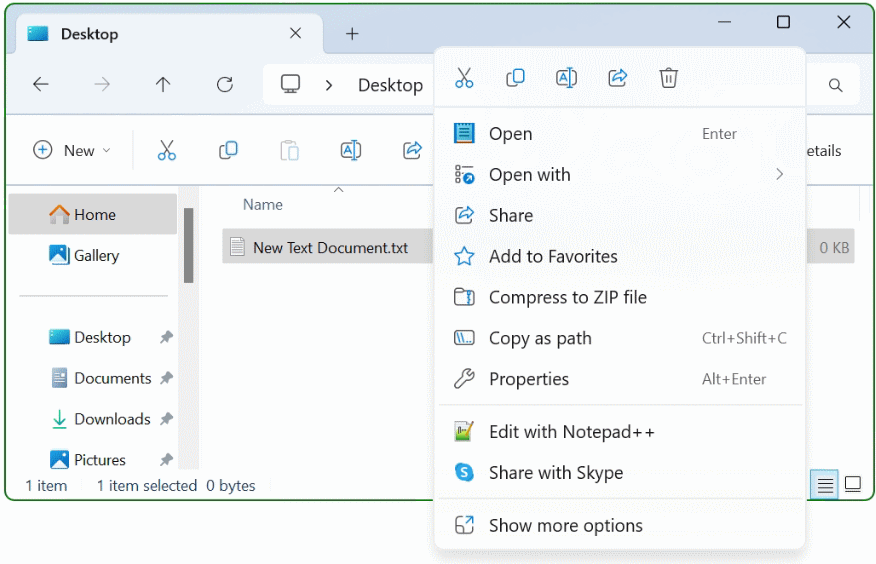
That tiny “show more options” button hides a lot more contextual info — and this is a fairly streamlined version of Windows 11’s new right-click menu. It’s much worse in many circumstances.
Microsoft
Even Explorer’s right-click menu has become extremely cluttered since Microsoft split it into two parts in Windows 11, with power options nestled deep into sub-menus within the sub-menu. Ugh. Unlike much else in the interface, this feels anything but well thought out.
The death of Windows 10
There is also reason to criticize the move to Windows 11 itself. It’s simply outrageous that Microsoft is removing security updates to Windows 10 when it’s still used on almost half of all computers.
However, after a week with Windows 10, it feels clear that Windows 11 is both smoother to use and more powerful than its predecessors. Now I’m looking forward to putting my old computer in the closet where it belongs and switching back to a modern operating system.
Further reading: I’m sticking with Windows 10 even after it dies in October. Here’s how
This article originally appeared on our sister publication PC för Alla and was translated and localized from Swedish.
